Building a Hosted Agents Product End-to-End
In a previous post, I covered building Isomux (github), a meta-harness where agents act like coworkers. It's open source and self-hosting is encouraged, but most people would rather not set up and maintain a VPS. So, I built the managed version: Hosted Isomux. Customers sign up, pay, and get their own office at yourname.isomux.app without touching a terminal.
This build-in-public post is meant to act as a playbook for hosted agent products (skip footnotes, they're implementation details). There are similar products for OpenClaw, like oneclickclaw.io.1
The product
The pitch is that customers get a 24/7 office for their agents at yourname.isomux.app, on their own private server. As described in isomux.com/hosted:
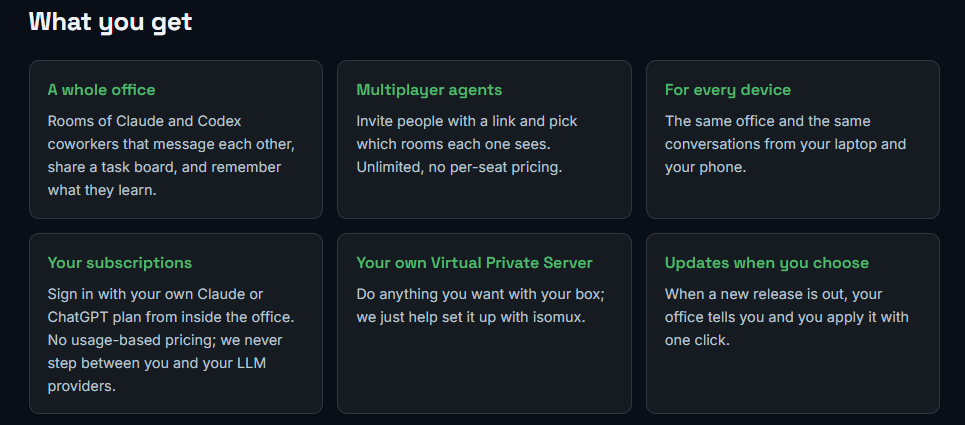
A separate VPS per user solves isolation: customers get their own virtual CPU and memory, so we don't have to handle resource allocation. And, most importantly, they get a clear privacy boundary.
"Your subscriptions" means users don't need to pay API prices. Instead, they log in to claude or codex inside the VPS (e.g., from the Isomux built-in terminal) and Isomux agents operate using those credentials. We never see them.
System architecture
The key property of the system is that, for daily use, the customer connects straight to their own box. The control plane provisions the office and gets out of the way. After that, our systems can go down and the offices keep working.
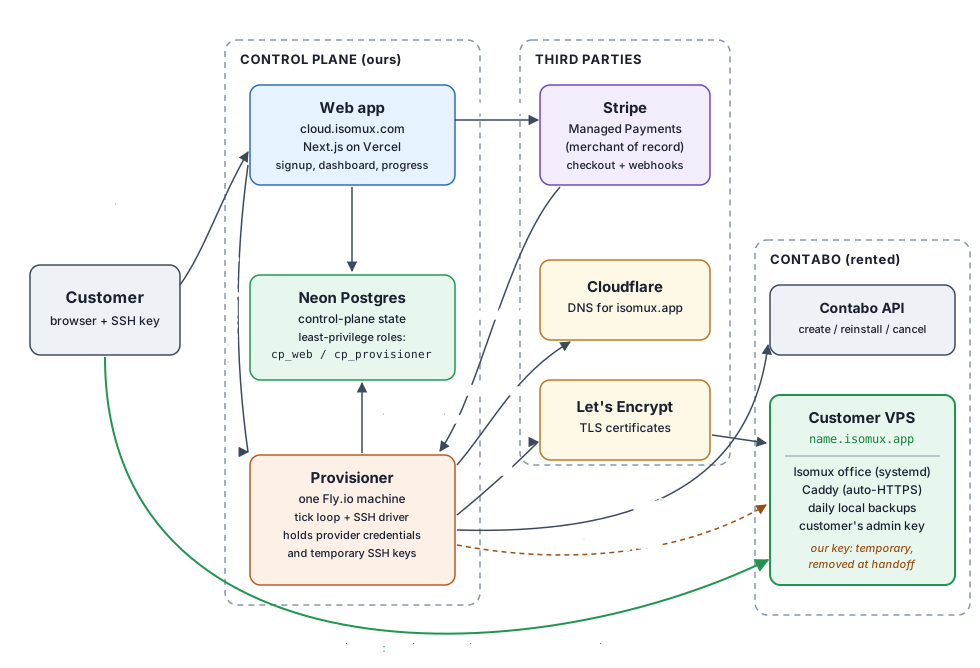
Component list:
- The storefront web app (cloud.isomux.com, a Next.js app hosted on Vercel): the place where users sign up with their Google accounts via
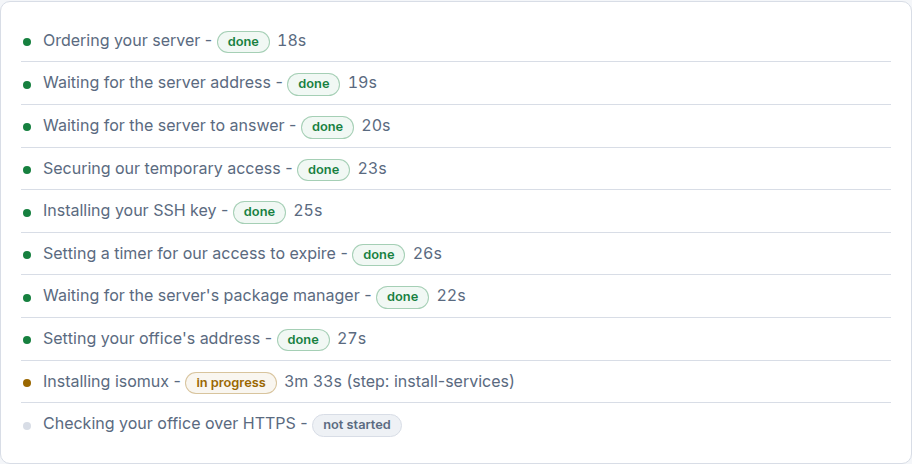
Auth.js, order an office, and get sent to Stripe to check out. After paying, they see a dashboard with step-level provisioning progress (pictured below). From the dashboard, they can also manage their VPS and subscription. It also has an admin dashboard that surfaces provisioning issues. The web app is the least privileged component because it's the most public. It cannot reach customer boxes; only the provisioner can, which is more locked down.
- Customer boxes are VPS instances we rent from Contabo. Once provisioned, they run the customers' offices as always-on services. We set up Caddy to act as a reverse proxy so the office is reachable from
https://somename.isomux.app. It's a.appdomain to isolate the cookies and domain reputation ofisomux.com(thevercel.comvssomeapp.vercel.apppattern). - Neon Postgres is the DB holding the control-plane state: accounts, box names, VPS instances, subscriptions, and box lifecycle status. The web app and the provisioner connect with different roles and permissions (more below).
- The provisioner is one always-on machine (Fly.io, located next to the database). It runs a 5-second tick loop polling the DB to check on the lifecycle status rows; it acts on the boxes as needed, over SSH, to drive the setup. It keeps SSH keys for the customer boxes out of the web app and the DB.
- Stripe handles billing through Stripe Checkout (we have no billing UI), with Stripe Managed Payments as merchant of record (more below). The provisioner receives Stripe's calls via webhooks, since it's the worker that's always on.
- Contabo (the provider) rents us the customer boxes (Ubuntu VPSs). The provisioner uses its API to create and cancel instances. It's a cheaper alternative to Hetzner (more below).
- Cloudflare serves DNS for
isomux.app. Each customer office gets an A record atyourname.isomux.app; we use Cloudflare because we need a DNS provider with an API. - Let's Encrypt issues the TLS certificates that make
https://yourname.isomux.appwork. The provisioner requests each office's certificate on its behalf (more below).
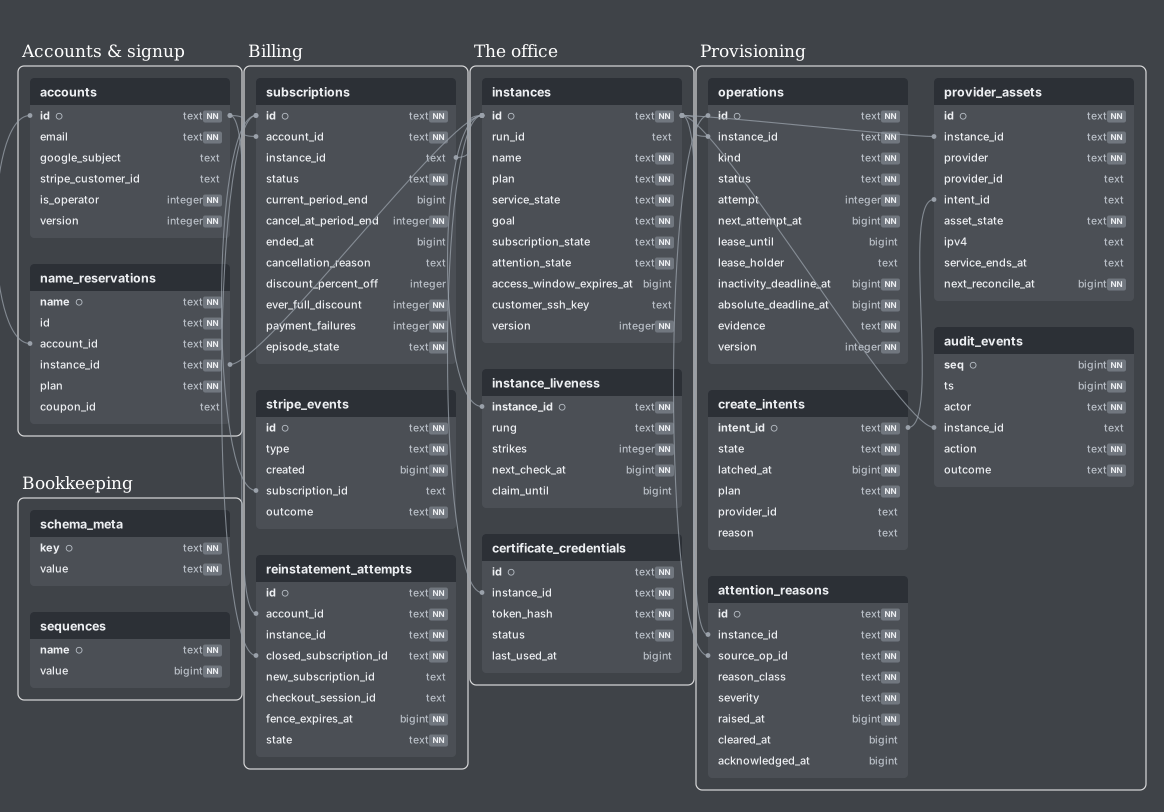
The codebase
Everything lives in the same public repo as isomux itself.2 I'll cite the LoC (lines of code) numbers as of writing to give some sense of proportion.
server/(69k LoC) andui/(43k LoC) are isomux itself, described in the architecture post. This is what runs on every box, self-hosted or hosted.deploy/(5k LoC) holds the installer. The provisioner copiesinstall.shto a new box and runs it. In about 5 minutes, it turns a fresh Ubuntu VPS into a working HTTPS office.3site/(3k LoC) holds the static-ish isomux.com site.scripts/(4k LoC) holds the release machinery (more below), among other scripts.control-plane/(44k LoC) has everything specific to the hosted product.web/is the storefront web app, andcli.tsis a CLI for driving the control plane used by the provisioner.
The total is at 168k LoC, most of it Isomux itself. Tests add another 117k LoC.
Testing
Isomux has four tiers of tests, based on how expensive they are to run:
- pure unit tests,
- integration tests against fake Claude and Codex backends (the main tier),
- contract tests that replay hand-written SDK events through the real backend adapters,
- and an opt-in live smoke tier that spends real model credits and asserts invariants only (this needs to run on SDK bumps).
The control plane runs additional tests against a real Postgres DB for the provisioning lifecycle behavior, like ensuring the database refuses to start a second installer for a box that already has one running. The suite runs against a DB branch in Neon before deploying (the 26ms round trips to Frankfurt turn a 50s local script into 10 minutes!).
The tests don't order a new Contabo box every time, but I do have a Contabo box set aside just for running the tests on it. Contabo has a reinstall operation that makes it appear like a freshly ordered box each time.
Product decisions
Below are some non-obvious design choices and how we handled the trade-offs.
Locking ourselves out of the box after setup
When you rent a VPS, the provider (Contabo) hands you an SSH key. Provisioning runs over SSH with that key.
But after setup is done, we delete our SSH key, and hold no access to the customer's box anymore. We do this to match the level of privacy one would expect from renting a VPS directly, without a middleman (with one caveat below).
When a user first visits their office from the storefront dashboard, we ask them to click a button confirming they are in, and we remove our key at that point. The provisioner verifies the removal by trying to reconnect, and requires the attempt to fail (by public-key rejection, not timeout).
There's a second mechanism to ensure we don't keep access even if the user doesn't click the button (or the provisioner is down). The provisioner's first act on a new box is to set OpenSSH's expiry-time in our SSH key to seven days in the future. sshd refuses the key after that no matter what.4
This has second-order consequences:
- We don't support external backups. Contabo, like most VPS products, offers an external backup add-on for an extra cost. We considered exposing the same feature to our customers, but that would mean holding extra copies of customer data, which complicates the lockout guarantee. I went with the simplest answer: a customer who wants protection against losing the box is in charge of making external backups. Agents make it easy to set up a cron job that replicates the functionality, making the feature less important.5
- We turn off backups for the provisioner's disk. Fly.io has backups on by default with five-day retention, but backups would keep copies of a private key for five days after we proved it destroyed. For the same reason, our temporary setup SSH keys live only on the provisioner's disk, which is the most isolated component.
- We can mint Isomux sign-in links only while our key is alive. Minting one needs shell access on the box, and invites are single-use and expire after 24h. Once our access is revoked, there is no path left for us to make another, which is why the dashboard nags the user to confirm they are in as the trigger for removing our key.6
- Customers carry a higher lockout risk. If we kept an SSH key, we could offer them a way to get back in from the storefront dashboard, which would be convenient. The mitigation is that the signup flow helps customers set up their own SSH key. Their browser generates a public/private pair and asks the user to save the private half; only the public half leaves the local browser so the provisioner can install it on the box. Generating the SSH key for the user instead of asking them to provide one keeps the "no terminal required" promise.
- We keep Contabo's owner privileges, whatever we do. A fact about any VPS-wrapper product is that we, as Contabo's actual client, are technically the renters for the users' boxes and have certain owner privileges: power, reinstall, and a rescue console that can reach the disk. We can't engineer ourselves out of that, so it's addressed in the Terms of Service and Privacy Policy: we only ever use the rescue console on a user's explicit written request, for a named incident, and we log everything we do.
Choosing a provider: Contabo
We chose Contabo because it had the most competitive prices compared to known alternatives like Hetzner.
One downside is that the Contabo API has a bunch of poorly documented quirks which we found by live probing, and had to work around. For example, the "create a box" endpoint spends money, but it's unclear if it's idempotent - if it times out, the box may or may not exist. So, right before the call, the provisioner writes a create_intents DB row that means "the paid call may have happened; create is forbidden for this intent". When the outcome is ambiguous, the provisioner resolves it by searching the provider's instance list.
Provisioning orchestration
The provisioner tracks each box's progress as durable operation rows in the DB (create_instance, create_dns, ...). One row is one step for one box, and it carries a status, the evidence of what happened so far, and when to try it again.7
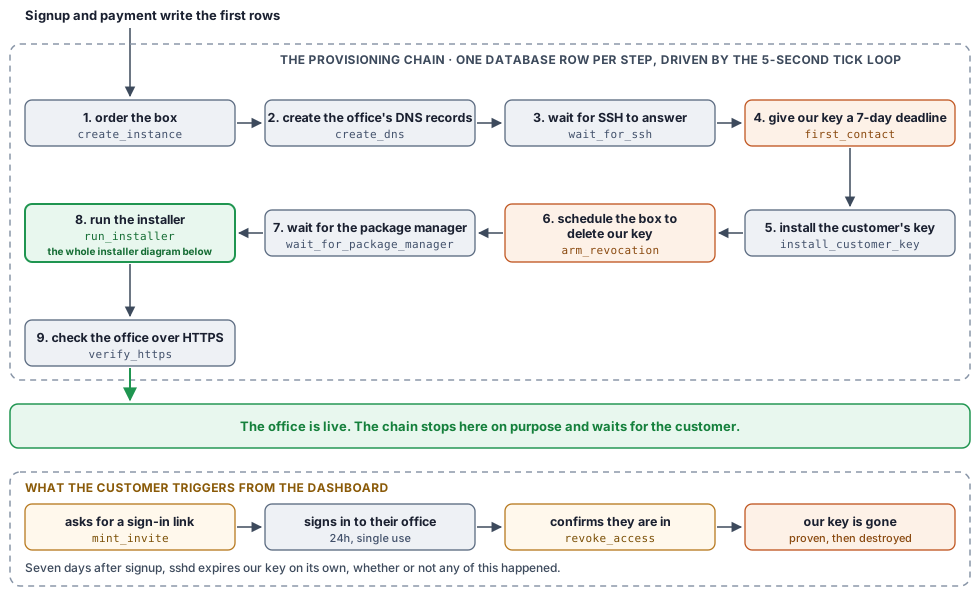
The provisioner runs a 5-second tick loop. Each row carries a next_attempt_at field saying when that step is due, so each tick is a single question to the database: which steps are due now? For each one, it:
- marks it as in progress so it's not picked by anyone else8
- does the remote work (a Contabo API call, a command over SSH, etc.)
- records the result and opens the next step, both in the same transaction
Since state lives in the DB and every tick starts by reading it, the provisioner can die mid-step and its replacement will pick up the work.
There's also a deadline on each step for when the provisioner is healthy but the task itself is not (e.g., the Contabo API stops responding). This raises a flag in the operator dashboard, but the step keeps retrying.
The biggest step is running the installer from inside the box. It turns a fresh Ubuntu VPS into a working HTTPS office:9
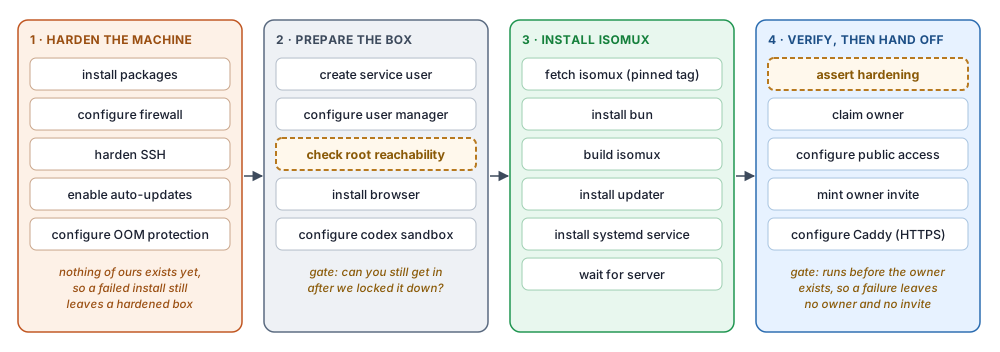
Securing the DB
The web storefront app and the provisioner get distinct DB roles with narrow per-table, per-action grants.[^stripekeys] The web role is the most restricted. E.g., it can enqueue operations but not drive them (INSERT and SELECT on operations, no UPDATE). Neither role can DELETE anything. We audit the permissions by keeping two lists: what each role is allowed to do, and what the deployed code actually does (as traced by a reviewer agent). A test ensures they match: no missing permissions and no extra permissions.
A similar split applies to Stripe: the storefront can only create Checkout Sessions; the provisioner can read subscriptions and invoices and expire stale checkouts. Neither of them lets someone issue refunds, move money out, or read a card number. Both the storefront and the provisioner refuse to build a Stripe client with a full account key.
The DB enforces connection budgets on the web app so no amount of web traffic can starve the provisioner. (Vercel decides how many serverless web instances run, so only a cap on the DB itself can bound the total.)
Stripe integration
Stripe tells the provisioner about subscription changes by calling our webhook.
We use Stripe Managed Payments so Stripe is the merchant of record (Stripe is legally the seller, not us). In particular, it means we don't need to worry about EU taxes (VAT) if we have EU customers. Stripe Adaptive Pricing means EU customers see and pay EUR at checkout while we settle USD.
While Stripe makes payments easy, we had to work around at least two issues:
- The first is a standard Stripe integration lesson: webhook calls can arrive out of order, so we treat each webhook as a signal that something changed, and we refetch the current state from Stripe for the source of truth.
- The design for a failed payment was: card fails -> Stripe retries -> retries run out -> Stripe calls the webhook to notify that the subscription status changed to
unpaid-> we power the box off and wait for the customer to fix their card. However, when testing, Stripe never producedunpaid; it deleted the subscription outright at the 9th failure. The fix was a dashboard toggle in Stripe; one of the few settings not configurable by API.
Getting Isomux updates to customers
An update requires restarting the office, which kills every in-flight agent turn. We let the customer judge when it's a good time for the interruption, so updates are initiated by them. Isomux periodically checks for new releases, and when one is detected, a "new release banner" appears with a button and a warning saying how many agents are mid-turn.
On our side, release.sh cuts a release: it tags a commit with a CalVer tag (v2026.7.19), gated on CI. I dogfoot the commit on my own office for at least a day first.
On the customer side, update.sh stops the office, takes a full copy of its state, checks the box's git checkout out to the new release tag, rebuilds, and checks that the office comes back up. If it doesn't, it restores the copy.
The control plane has no access to customer boxes (we cannot even see what release each box runs), so we have no way of doing a "fleet-wide" patch or check. This is a concern for security patches. Our mitigation is to label security releases with a security marker; the "new release banner" notices it and tells the user that it's important that they update.10
Customer-friendly cancellations
My isomux office is my second brain - losing access to it is very disruptive. With that in mind, customers may have a lot of important data inside their box, so I wanted a policy that doesn't delete it instantly over a missed payment.
There are three dates:
- the instant the paid period ends (the office powers off)
- the retention boundary: 14 days later. Until then, restarting their subscription powers the same VPS back on with the data intact. A customer who only needs to retrieve their data can also ask support for a free temporary power-on.11
- Contabo's own paid-term end: that's when the data actually disappears. We make sure it is after the retention window.
Having a retention window means we eat the cost of renting the box an extra month (Contabo does not allow partial renting), but it felt like a necessary guarantee for a product like this. After the retention window, we request Contabo to wipe the box as soon as possible.12
Sizing the boxes
The Contabo entry tier is a 4 vCPU / 8 GB box at EUR 5.50/month. So the question is, is that enough? To answer it, I ran my office on one for a month.
I found that the main bottleneck is RAM. Running 10+ agents at the same time was fine most of the time, but if multiple tried to build codebases at once, that could easily trigger an OOM (Out of memory) error.
Sampled on my office, active Claude agents use 314–421 MB of RAM and Codex agents use 136–158 MB of RAM. ~1 GB goes to the OS. But building Isomux can take 3 GB, so sending multiple agents to work in parallel worktrees could crash it.
We address this in two ways:
- Offer two tiers: entry and poweruser. The poweruser tier is an 8 vCPU / 24 GB box, which costs us EUR 11.90/month at Contabo; I plan to move my own office onto it.
- Harden the boxes against OOM regardless of tier. We do defense in depth based on various ways in which I hit OOM myself:
- Capping the office memory. The office runs as a service under
systemd(Linux service manager), which manages the main office process; in turn, the office spawns subprocesses (the agents), which spawn their own subprocesses (tool calls). The service puts all those processes into one group, and caps it at the box's RAM minus 1 GB. This way, Isomux can only hit its own ceiling, not the machine's, and SSH and DNS keep working. There's also a soft threshold at 85% of the cap where the kernel starts evicting cached memory, moving pages to swap, and slowing down the processes asking for more memory. - A big swapfile. The box ships with no swap, so the installer adds an 8 GB swapfile. This is where the kernel pushes the office's memory when it crosses the soft threshold. An overloaded office gets slow instead of losing an agent, and it recovers when the spike passes. The office is allowed most of the swap, but some is reserved for the rest of the box.
- Smart kill order. When the office hits its hard limit, either because the growth is sudden or because even the swap is full, the kernel has to kill something inside it. First, we tell
systemdto keep the service running when one of its processes is killed, instead of tearing the whole thing down. Second, we adjust the kill priorities so the main office process is killed last. Among the rest, the kernel picks the largest, so a big build is targeted first and only costs a failed tool call; the agents stay alive. - Killing early. The cap mentioned above only watches the office, but the excessive allocation can also come from the OS or anything else the user runs on the box. The kernel's killer only fires once memory is genuinely exhausted, by which point the box may have been thrashing the swapfile for a while. So, the installer adds
earlyoom, a watchdog that watches the whole box and steps in while there is still memory left to act. It's configured to spare the office and the box's own critical services like SSH and DNS.
- Capping the office memory. The office runs as a service under
We benchmarked the effect with fake agents. On an entry box, after adding these measures, the out-of-memory killer stopped firing entirely, even at 24 agents plus a 3 GB build. The office stayed up, with every agent alive, and the box still answering SSH. However, the local work around each agent's turn went up from 300ms to 30 seconds for the slowest 5%. The slowdown started around 14 agents plus a 3 GB build.
Issuing TLS certificates for every customer
A TLS certificate is what makes https://yourname.isomux.app work: the browser uses it to check it really is talking to the VPS.
Let's Encrypt, a nonprofit certificate authority trusted by browsers, hands them out free and automatically (over a protocol called ACME), so most people never think about them. But in our case, getting a certificate for each somename.isomux.app is a provisioning step.
The first issue is that Let's Encrypt only allows 50 new certificates per domain per week (renewals don't count). Since every office lives under isomux.app, we can only onboard 50 offices per week. If signups ever outgrow it, the standard fix is registering isomux.app in the Public Suffix List, which gives every customer name its own budget.13
The second issue is that we need a certificate not only for myname.isomux.app, but also for everything one level below it: *.myname.isomux.app. The reason is that Isomux is also a personal-software suite: agents can host their own web apps at myapp.myname.isomux.app. If every app got its own certificate, one customer could burn the whole week's budget.
Wildcard certificates are a bit tricky to get. For an ordinary hostname, the server requesting a TLS certificate generates a public-private key pair and sends the public half along with the hostname to Let's Encrypt. Let's Encrypt gives the requester a file to put under that hostname, and then fetches it from that hostname. Serving it back proves the requester controls the hostname. Let's Encrypt then signs the public key and the hostname together; that signed statement is the certificate, and the private key is what the server later uses to prove to browsers that the certificate is talking about it.
For a wildcard certificate, there's no way to serve a file at every possible *.name, so Let's Encrypt requires you to place a record in the domain's DNS instead.
This creates a conundrum: we don't want customer boxes to hold the credentials for editing the DNS records of isomux.app, and we don't want our systems to hold the private key used to prove the customer box's identity.
So, the job of getting the TLS certificate is split. The customer box makes the key pair; the secret half never leaves it, and the public half is sent to the provisioner, which holds the Cloudflare credentials for isomux.app's DNS. The provisioner makes the Let's Encrypt request, writes the proof record into Cloudflare, Let's Encrypt checks it and signs the request, and the provisioner hands the certificate back to the box.
On the box, the certificate is used by Caddy, a web server our installer sets up that sits in front of the office: it owns port 443, terminates the encrypted connections for the office and all its app subdomains with that one certificate, and forwards the traffic to the office process (which can then dispatch it to the app processes).
Starting a company around the product
It made sense to start an LLC for Hosted Isomux, even if the transaction volume stays small.
The main reason is liability. If a box gets abused, or a customer loses data, the claim lands on the company instead of me.
To keep things clean, it's better to separate my money from the company's money. Thankfully, for a single-member LLC, taxes stay simple (no separate federal return).
Starting a company took a few steps, each under 1h of filing forms:
- File the LLC: about $100.
- Get an EIN from the IRS: free. Everything below asks for it.
- Open a business bank account: free. I used Mercury, a common recommendation; approved the same day.
- Register for city business tax: free, and exempt below a revenue threshold.
- Open Stripe under the company, with payouts going to the business account.
- Small things like creating the
llc@isomux.comemail or getting a Google Voice phone number to avoid doxing myself (company filings are public).
I was later told I should have filed the company in Delaware because it makes it easier to raise money; investors essentially expect it. But I'm not planning to raise for Hosted Isomux (feel free to slide into my DMs though, lol), and registering in Delaware while living somewhere else does not replace your home state, it adds to it: in addition to Delaware's own stuff, you need a foreign-entity registration at home anyway. If I ever do raise, my understanding is that converting it is more or less a known path.
How it was built
Hosted Isomux was built by a team of Isomux agents running on an entry tier box (the one that costs EUR 5.50, but self-hosted), in about a month, as my main (but not only) project. I think the work would fit under one $200 Claude sub and one $20 ChatGPT sub, so I'd price the AI cost at $220.
My workflow relies heavily on inter-agent communication (4k agent-to-agent messages in the first half of August):
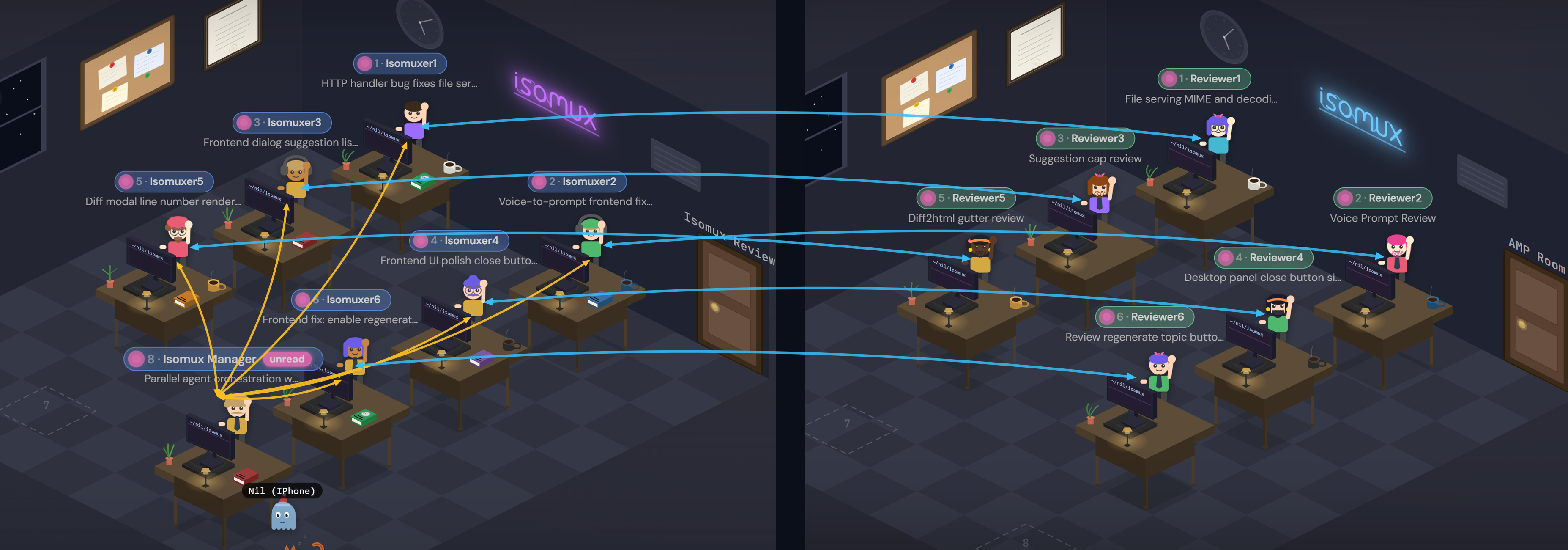
There are three types of agents: 1 PM, 6 workers, and 6 reviewers.
- The PM: the main agent I talk to; it dispatches work to the workers. It can clear the context of the workers and reviewers and adjust their thinking effort depending on the task. It runs Fable 5, the most pleasant model to interact with and the one with the best judgement in my opinion, which helps keep other agents in check.
- The workers: Opus 5 agents that get tasks assigned by the PM.
- The reviewers: GPT 5.6 Sol agents that pair up with workers to review their plans and code. Mixing Claude and Codex agents is intentional to smooth out provider-specific blind spots.
The PM and I work in one of two modes: deep or wide.
- Deep mode is for when there's long sequential work. After aligning on the scope with me, the PM tackles it in a loop, assigning one task at a time to a worker, keeping its own context focused on orchestrating. I often leave deep mode running overnight and ask for a consolidated report in the morning.
- Wide mode is for when a lot of small tasks pile up (often leftovers from deep sessions). In Isomux, agents can file tasks to a task board, which is where tasks pile up. The task board acts as the handoff mechanism between the PM and the workers. Wide mode starts with my custom
/isomux-pm-sessionskill, which asks the PM to look up all the Isomux tasks, propose a set to tackle in the session, and group them into up to six batches without overlap. I then look at the task set and we align on it. The PM dispatches one batch to each worker, which typically work on separate worktrees. The PM waits for the workers to report back, iterates as needed, and eventually handles merging the batches to main. Like deep mode, it ends with a consolidated report for me. One wide-mode session can close 10-20 tasks at once while opening just as many new ones.
I don't read any code. I align with the PM through these reports, and it can take me an hour to fully absorb what was done and why, and what needs to be fixed or changed. I've developed a good sense for when the agent is inferring or rationalizing something that may not be true; I use my judgement for when to dig deeper or just rubberstamp. I do read every bit of copy that is user-facing, and edit it to fit my voice.
Writing a blog post like this at the end of a project is also how I make sure I understand the full system. This one took about 4 days and uncovered a few rough edges.
Takeaways
Building a "VPS-wrapper" product turned out to be more involved than expected, but I'm glad I did it (and in public), regardless of how many customers I get. Once you try running agents on your own always-on machine, the benefits are obvious, and VPSs fill the gap between self-hosted and SaaS products. So, I believe that agents running on VPSs will be a massive infrastructure piece in the agentic era, and now I have a much deeper understanding of it.
As Brian Armstrong said, action produces information.
If you want the full detail, the design docs and the control-plane reference live in the public repo. If you'd like your own office, check out isomux.com/hosted.
Footnotes
-
We diverge from their design in some places. For example, their docs state that they retain SSH access to customer servers, which makes some things more convenient but requires trust. We remove our SSH access after setup (more on this here). ↩︎
-
Why a monorepo? The installer script the provisioner uploads to each customer box is the same one a self-hoster runs, and the control plane depends on office internals like the readiness endpoint and the invite API. One CI run proves both halves agree instead of having a cross-repo contract that can drift. The storefront is its own package, so if a self-hoster runs
bun installat the root, it's not installed. And, since we claim we lock ourselves out after setup, it helps that anyone can read the code. ↩︎ -
Anyone can run Isomux locally just by running the server with bun, but the script is independently useful to self-hosters because making it multiuser without a VPN involves setting up HTTPS, running Caddy outside of Isomux, and benefits from things like SSH hardening. ↩︎
-
The provisioner also schedules a timer on the box to delete the expired key after the seven days. Why both an expiration date and a scheduled deletion? The date rides inside the key's own line in
authorized_keys, so it holds even if the deletion is never scheduled or doesn't fire. The scheduled deletion removes the key file entirely, so a useless key doesn't stick around. ↩︎ -
Isomux (self-hosted or not) makes daily backups (the entire state, tarred and verified) and saves the seven latest verified copies. But those copies live in the same box as Isomux itself - it doesn't help a customer who gets locked out of their VPS. ↩︎
-
The invite link itself is never written to disk or DB; the provisioner mints it on request from the storefront (via a DB operation row) and holds it in memory for five minutes; the storefront fetches it directly from the provisioner (by retrying every 2s until it's ready). It's the only direct communication between them. ↩︎
-
An example of a finding from this: a box can accept SSH and not be ready yet. Two minutes after boot, Ubuntu was still doing its own package work and holding the package manager lock, but answered SSH at 88 seconds. An installer that starts in that window dies immediately. So "wait until the package manager is free" became its own step with its own deadline. ↩︎
-
By design, there's a single provisioner process, and it runs a single tick at a time, so race conditions are not possible. However, provisioning steps can also be triggered from our operator CLI, so marking rows as "in progress" prevents them from being picked twice. The catch is that if the provisioner dies, it can leave a task marked "in progress" forever. That's why the provisioner also writes a deadline in the
lease_untilcolumn, after which the row is fair game to be picked up again. ↩︎ -
Since the installer runs many steps inside the box and can take 5+ minutes, the provisioner needs a way to track progress (to report it on the user dashboard and to know whether it needs to retry the installer). On the box, the installer runs under a small wrapper script that records the current step and its final exit code to a file, which the provisioner reads over SSH on each tick. ↩︎
-
Some more forceful options we may consider: making the updater auto-apply security patches, having boxes report to control plane which version they run, and Contabo power-off (as a last resort). ↩︎
-
A self-serve version is planned, where users press a button from the storefront dashboard to get access for 4 hours, as long as they are within the retention window. ↩︎
-
We currently don't reuse already-paid boxes after the retention window for a different customer. That's an optimization to consider in the future, though it must come with strong proof that no prior customer data remains. ↩︎
-
During development, we hit a separate limit: Let's Encrypt allows only 5 certificates for the exact same hostname per week, and our install-test cycles burned all five on the test hostname in one day. We had to switch testing to a fresh hostname. The lasting fix is that automated tests should never talk to Let's Encrypt at all and use a local stand-in instead. ↩︎