Isomux: Designing a Meta-Harness
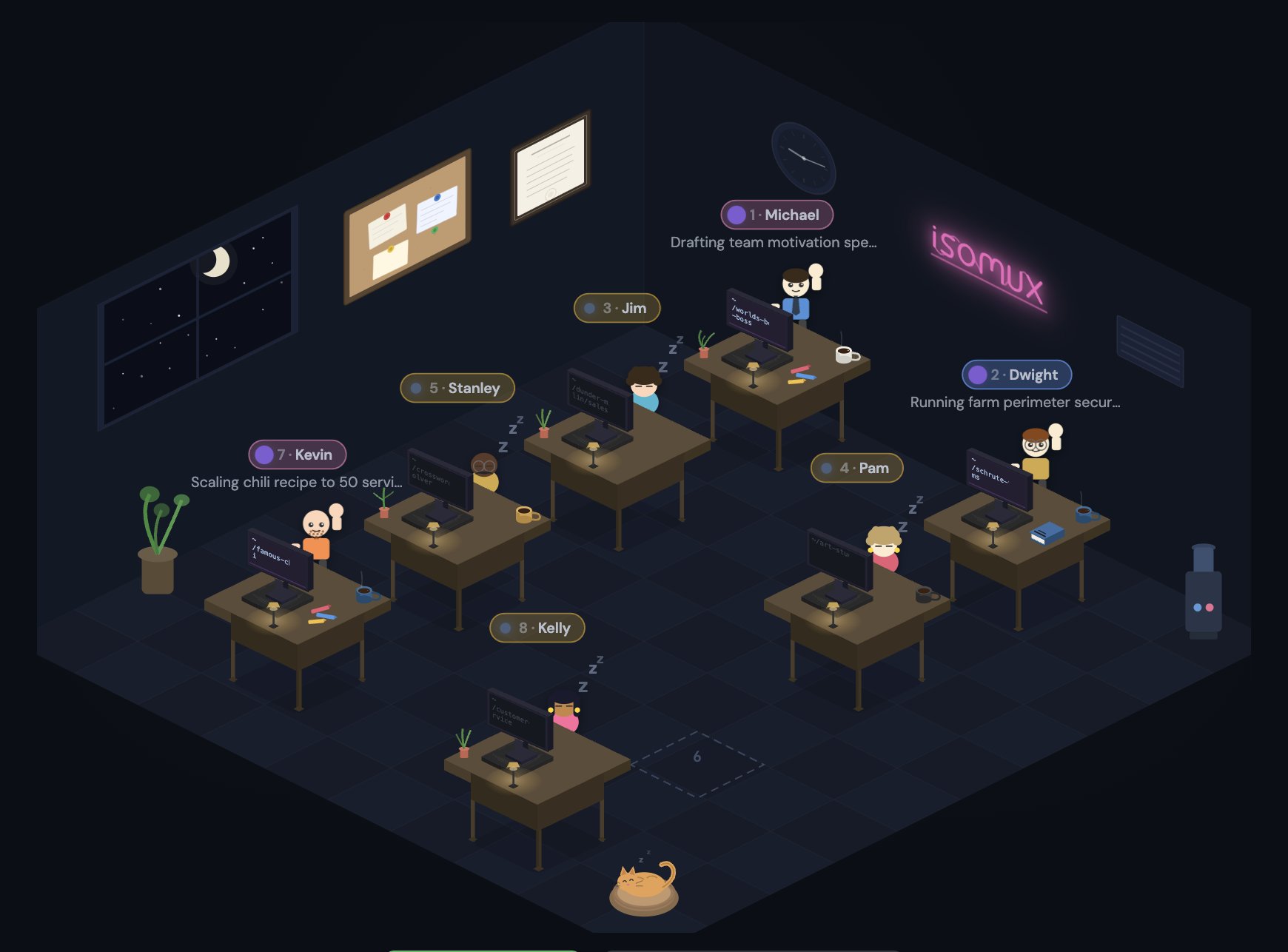
This post covers how I built isomux.com (github) and the lessons I learned about designing meta-harnesses.
I describe independently-developed features like inter-agent skills, "Google Docs"-style live collaboration, meta-harness reflection, agent-driven UI, hierarchical agents, an agent-human shared task board, and (in a standalone post) a personal-software suite.
For a closer look at the UX side, see Making Agents User-Friendly.
Introduction
I went through every level of Steve Yegge's hierarchy.
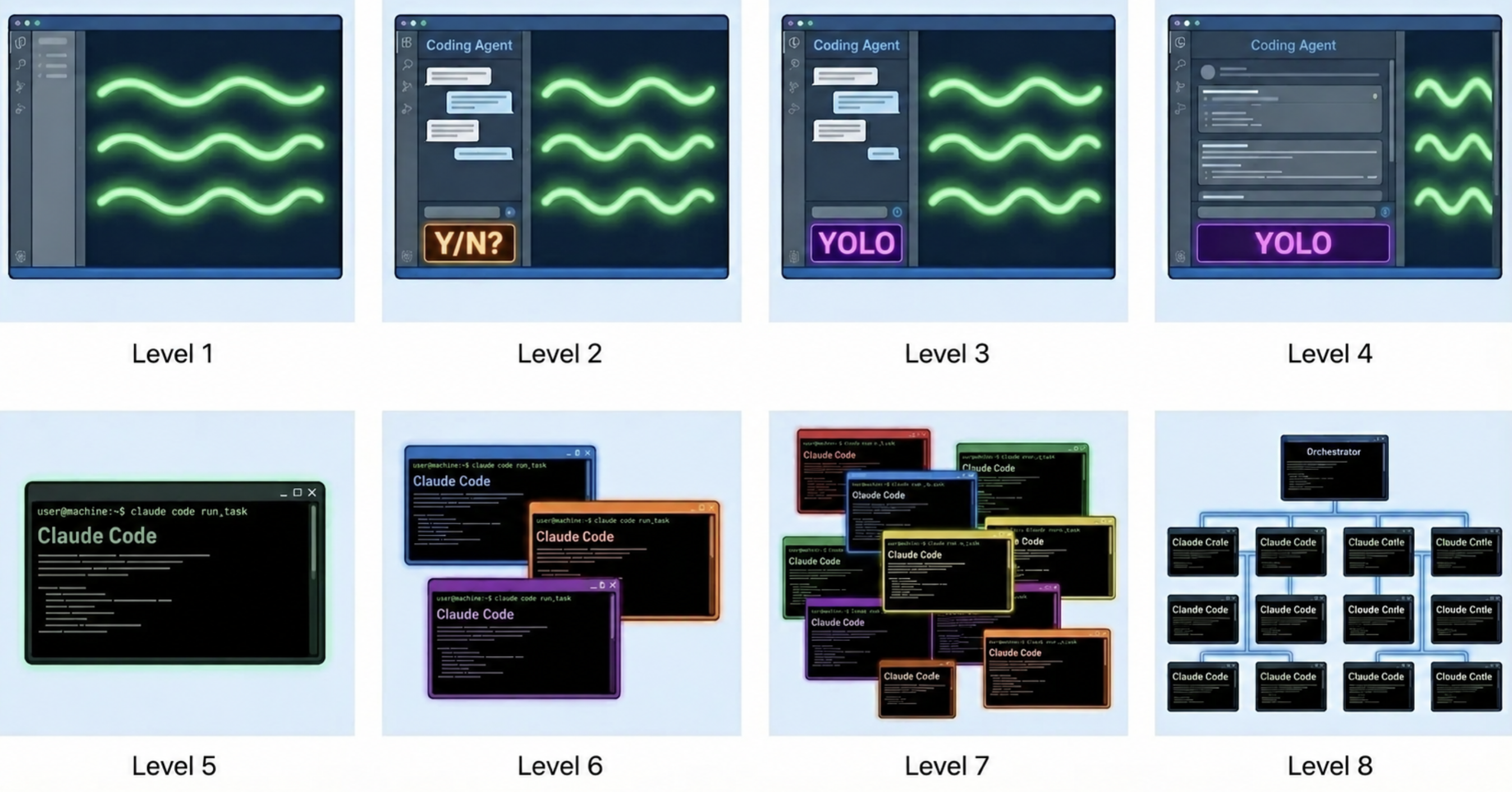
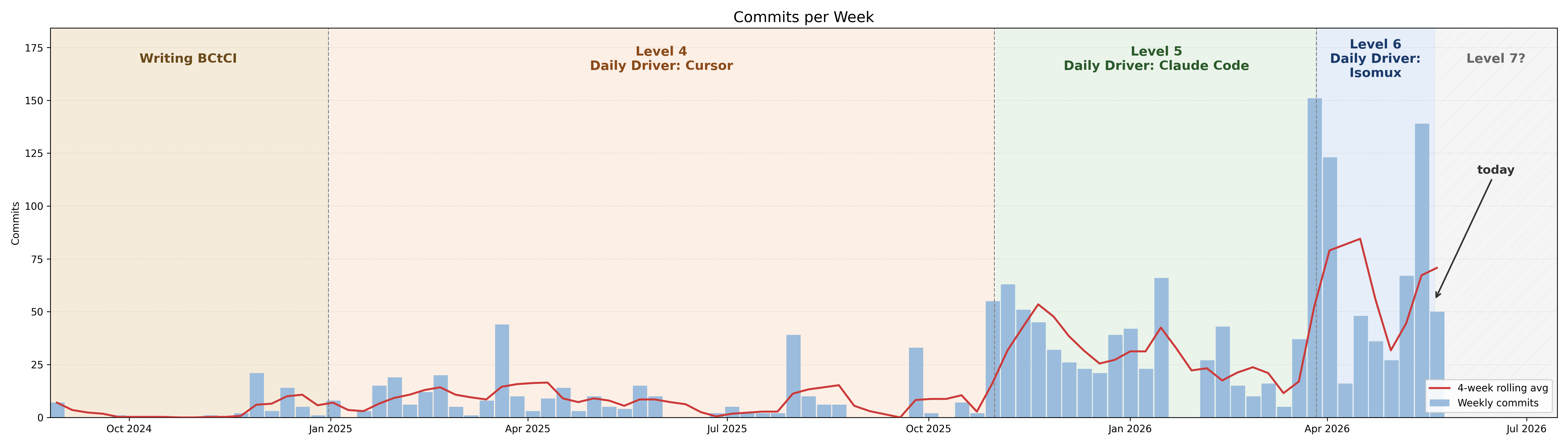
Isomux started as a nicer way to manage agents; back then, I had a mix of local and remote sessions.1 For the former, I had to keep my laptop open; for the latter, I had to ssh all the time.
The fix was to run all my agents on a server with a browser UI:
- All my devices see the same agents and conversations.
- All my agents outlive my laptop and see the same environment.
Over time, I developed Isomux into a meta-harness: Claude Code and Codex are harnesses around models, while Isomux sits one level above them and runs them side by side.2
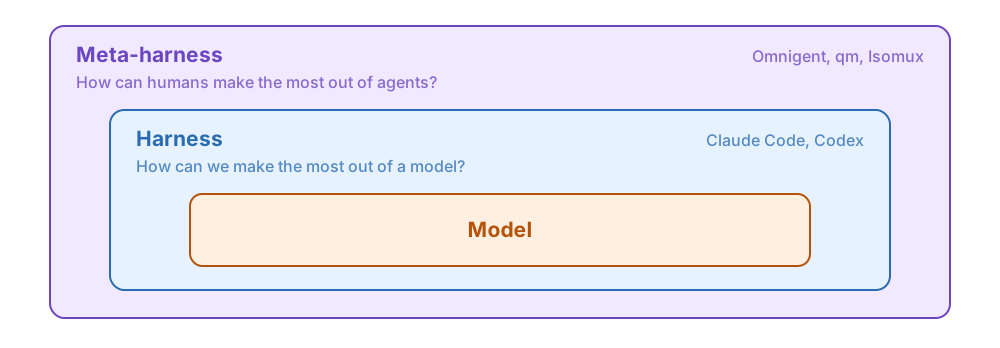
This refined my thesis of what a meta-harness should be:
Thesis: every conversation should be multi-user, multi-agent, multi-provider, and multi-device.
Office Metaphor
Isomux (Isometric Multiplexer) has something extra: it's cute.
I spend all day managing agents, and I wasn't a fan of the Claude Code UX. I got a bit creative and made an office metaphor for agents (with isometric graphics for the nostalgia).
Each agent has a customizable name and look and sits at a desk. You see who is working, who's sleeping, and who needs you (hand raised) at a glance.
The idea is that by anthropomorphizing agents, we make them accessible to non-technical users; coordinating with humans comes naturally to everyone.
In the hierarchical agents section, we'll see more implications of this metaphor.
Architecture Overview
Isomux is a single bun process that:
- serves the browser frontend
- talks to browsers over WebSocket for live updates
- exposes a REST API for everything else
- manages agent lifecycles and sessions
The server is event-driven. Updates come in from three ends: browsers (over WebSocket), the REST API, and the LLM providers (via the agent sessions). Everything funnels into a single event loop, where each event can trigger some combination of: (a) browser updates via WebSocket, (b) agent session updates, and (c) state writes (all the state is stored in ~/.isomux).3
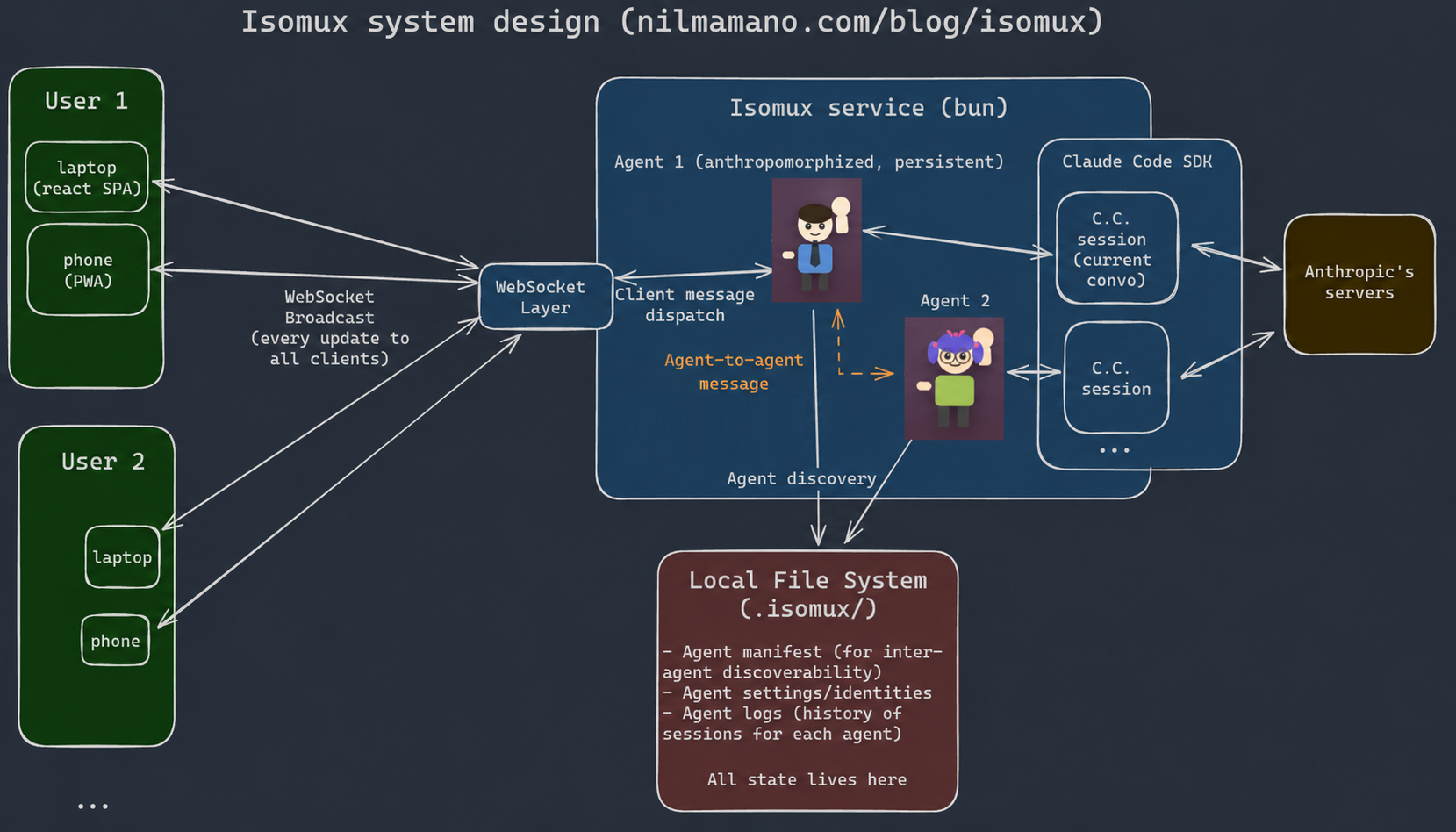
Claude agents use the Claude Agent SDK, Codex agents use the Codex CLI's App Server, and OpenCode agents use a shared OpenCode server. All three sit behind the same backend abstraction. There are multiple ways of making a meta-harness multi-provider; the appendix shows a comparison.
I've been building Isomux from inside Isomux since the first day. Developing a dev tool from itself is fun!
Meta-Harness Reflection
Isomux has many features and configurations, but every knob in the UI can also be tweaked with a REST API.
This pays off when you describe the API in the agents' system prompt. The agents running inside the office understand it and can control their own setup (reflection, in the programming-language sense).
For example, an agent can:
- Create a new room:
POST /api/rooms - Spawn a teammate in it:
POST /api/agents { roomId } - Set the teammate's model and system prompt:
PATCH /api/agents/:id - Create a task on the shared task board:
POST /api/tasks - Assign it to the teammate:
PATCH /api/tasks/:id { assignee } - Message the teammate to start working on it:
POST /api/agents/:id/messages { text }
Scoped tokens limit which agents (and humans) can do which actions. Users can promote an agent to have more privileges; when they do, the server starts injecting a mention of the additional API endpoints into their system prompt, so agents know what they can do.
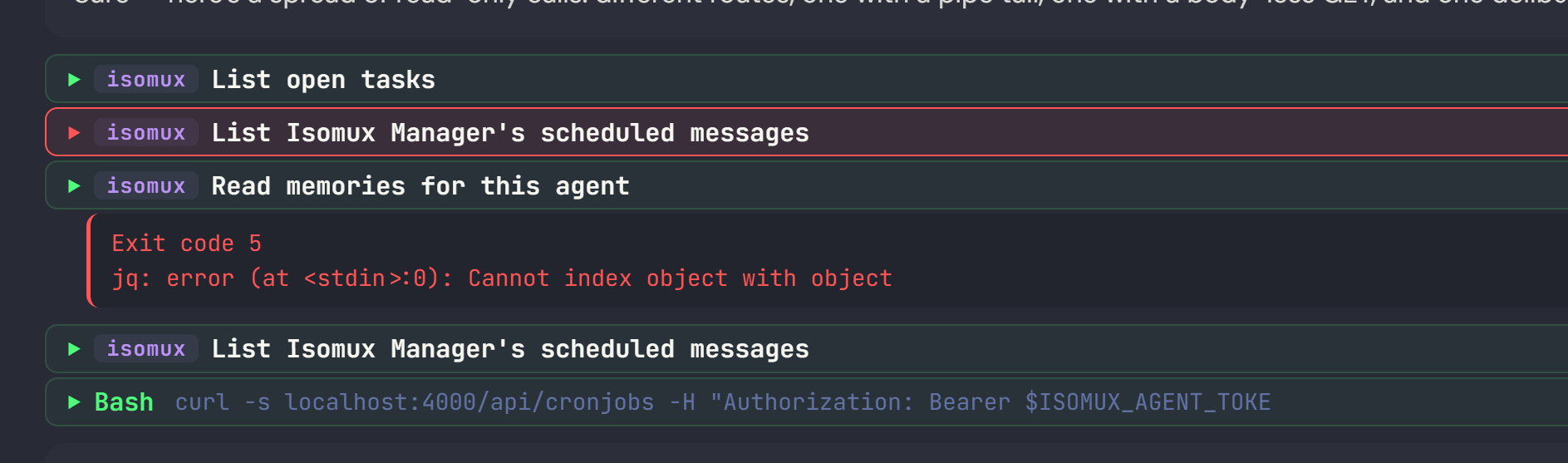
Bonus: the UI formats curl calls to the API in a nicer format than general bash commands.
Giving Agents UI Superpowers
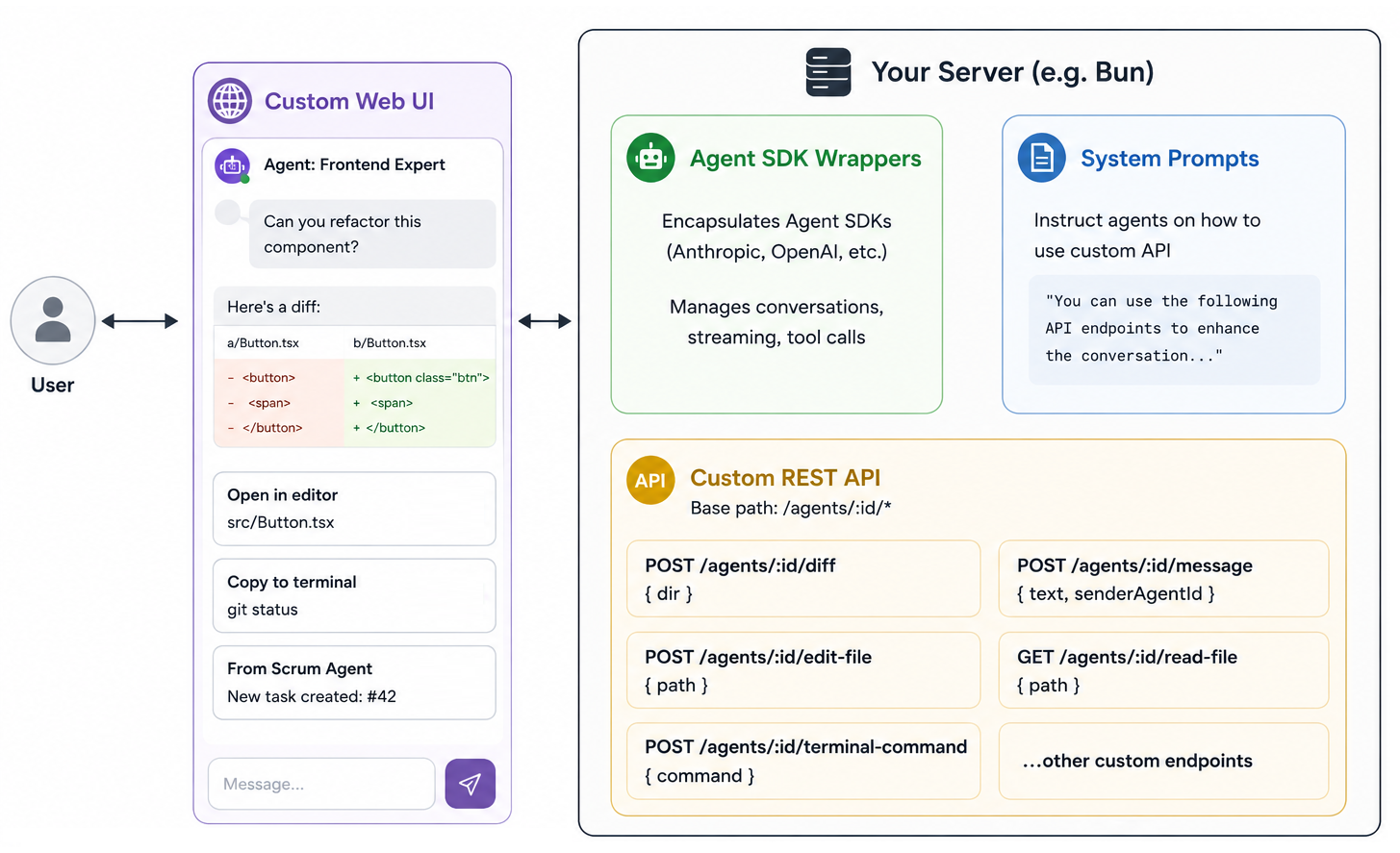
The REST API can also enhance the agents' UI capabilities, so they can put things in chat beyond text.
Here's the general recipe:4
- Add a REST endpoint for inserting a custom component into the agent chat.
- Tell agents how to use the endpoint in the system prompt.
Once those two pieces are in place, you can start giving your agents "UI superpowers":
- Render styled side-by-side diffs in chat:
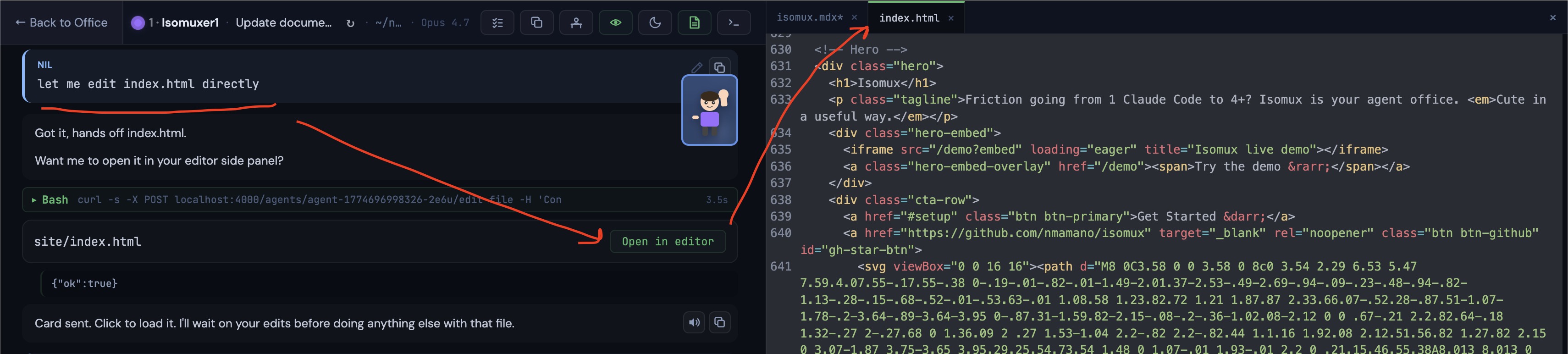
POST /agents/:id/diff { dir } - Surface "Open in editor" cards for files:
POST /agents/:id/edit-file { path } - Surface "Copy to terminal" cards for commands:
POST /agents/:id/terminal-command { command } - Render images in chat:
POST /agents/:id/read-file { path } - Screenshot web pages (e.g. a dev server) into chat:
POST /agents/:id/preview-url { url }
Office-to-Office Communication
The REST API had a fun consequence: if two Isomux processes could reach each other, agents in one could call the endpoints of the other.
I discovered this accidentally when an agent in my laptop office filed a task on the task board of my server office (both were in the same VPN).
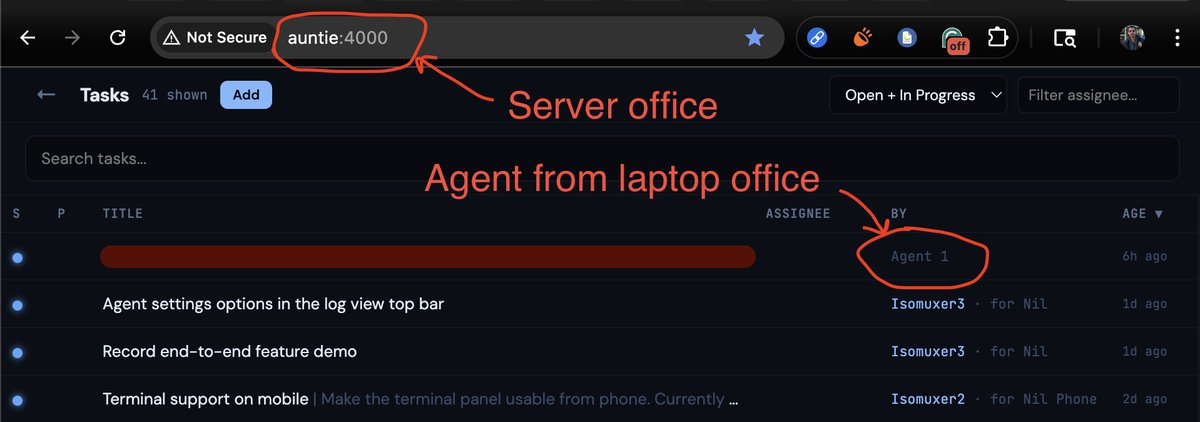
The scoped-token system later closed this hole: every agent request needs a token issued by the office it targets.
The WebSocket Layer
If REST is how you act on Isomux (reflection section), the WebSocket is how you watch it: an agent's reply streaming in, a room being created, or another person moving rooms.
Browsers hold no authoritative state of their own. When one connects, it gets a full state snapshot, and from there incremental events keep its copy in sync.5 The server fans out each event only to the clients allowed to see it.
On the client-to-server direction, the WebSockets are used for ephemeral updates that don't belong to the REST API: terminal keystrokes, user presence (who's looking at what), and heartbeats.
Hierarchical Agents
When designing an agent management system, how should we organize agents?
For Isomux, I decided to organize them hierarchically. This is not a new idea: file systems are hierarchical, for example; but I haven't seen it applied to agents.
I don't mean top-level agents spawning subagents which in turn can spawn their own subagents - most harnesses already do that (including those in Isomux). I mean the top-level agents themselves are in a hierarchy.
Isomux organizes everything as a hierarchy: an office holds rooms, each room holds anthropomorphized persistent agents, and each agent wraps a sequence of ephemeral sessions.
This hierarchy affects:
- The UI (you only see agents in the same room at once)
- The user-defined system prompt(s)
- Agent memory
- The task board (tasks are scoped to a room, or shared office-wide)
- Usage tracking
- Notifications (can be turned on or off at the room level)
Persistent Agents
The first level of the hierarchy is grouping ephemeral sessions into anthropomorphized, persistent agents.
When you click an empty desk to spawn an agent, you provide:
- a name and look
- a working directory
- the backend (Claude, Codex, or OpenCode), model, permission mode, thinking effort, etc.
- an agent-specific (user-provided) system prompt
Agents also have:
- Their own conversation history that can be resumed with
/resumeand inspected by other agents - Their own memories
- Their own usage tracking
- Their own inbox other persistent agents can reach it at
Crucially, persistent agents enable agent-to-agent communication. The agent exists even when there's no ongoing session, meaning that other agents have a target to message.
Something feels nice about going to different agents for different things.
For example, my Tax Expert agent did my taxes. When I go back to her next year, I'll find all my past tax-related sessions and attachments there - and she will just know to search them for relevant context. And she will have memories from last year. And if another agent, like my Home Assistant agent, has some question about taxes, they just know they can direct the question to her.
A folder gives you most of that; e.g., AGENTS.md can capture an agent's personality, /resume is already per folder, and so are Claude's built-in memory capabilities. But I think coupling folders and agent identities is wrong. (1) You may want multiple agents with distinct identities in the same folder (e.g., a frontend agent and a backend agent); (2) You may want to move an agent across folders without losing its identity. (3) You are also coupling the backend with the agent identity. A Codex or OpenCode agent in that folder won't see Claude's memories.6
Hierarchical System Prompts
The system prompt for a given agent is assembled from a mix of hardcoded, user-defined, and agent-defined sections:7
- Introduction (hardcoded): establishes the setting: "You are
NAME, an agent in roomROOM_NAMEof the Isomux office. ..." - Meta-harness features (hardcoded): a description of how to use Isomux features, with subsections like "How to discover other office agents", "How to use the task board", "How to show a styled code diff", etc.
- Manager prompt (user-defined): information about the specific human user who spawned the agent (independent of which room the agent is in).
- Office prompt (user-defined): instructions for every agent in the office. (This is the ChatGPT-equivalent of "custom instructions" that apply to every conversation.)
- Room prompt (user-defined): instructions for every agent in a given room.
- Agent prompt (user-defined): instructions for that agent.
- Manager memories (agent-defined): memories about the specific human user who spawned the agent.
- Office memories (agent-defined): office-wide memories.
- Room memories (agent-defined): room-wide memories.
- Agent memories (agent-defined): memories for that agent.
User- and agent-defined sections are optional. More on memory later.
Rooms let you group agents that need a shared context. E.g., you could have a room for your day job and a room for your side projects; or each user in the same office could get their own room.
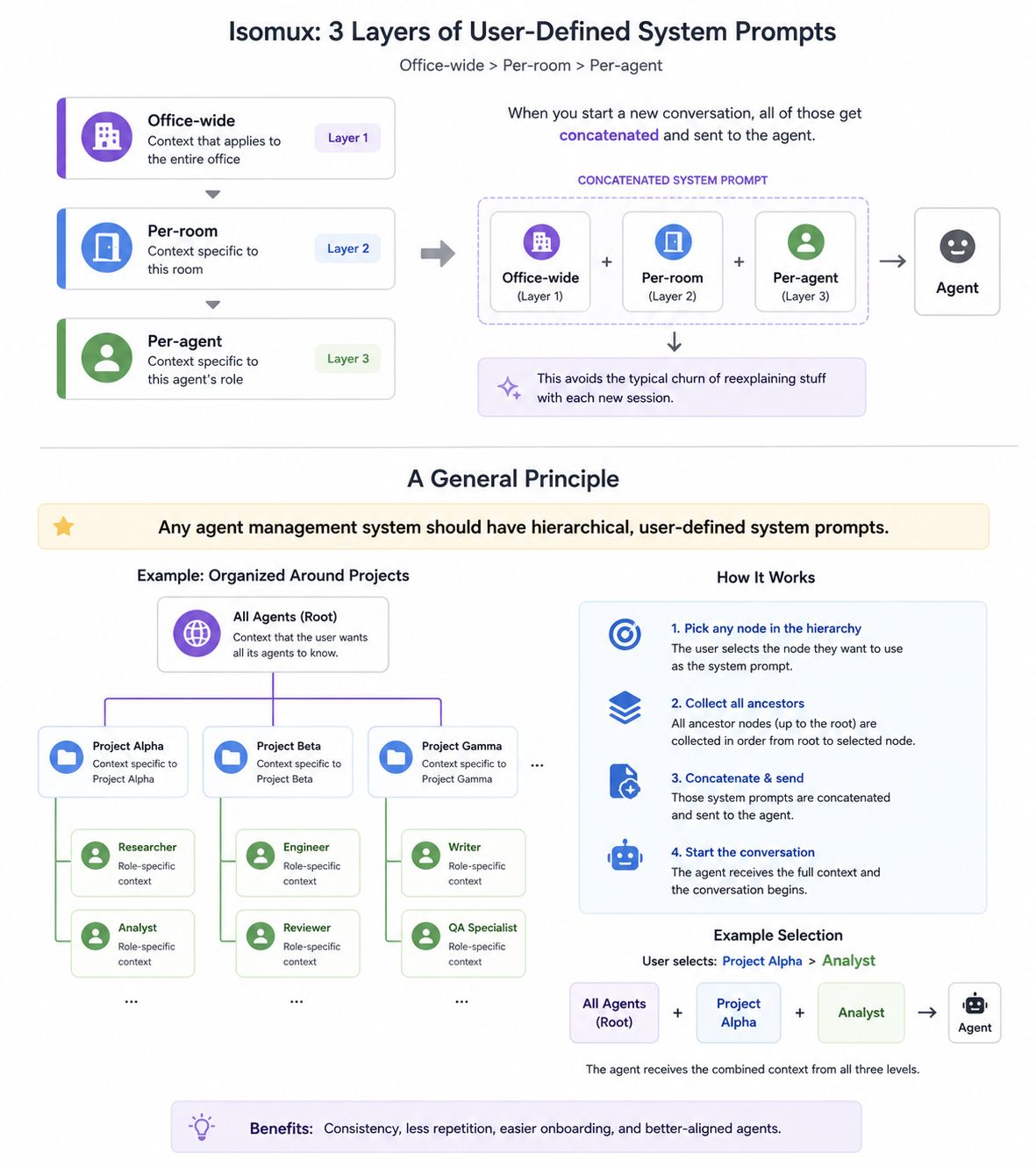
You can see the full prompt for a given persistent agent with /isomux-system-prompt. Here is the output for my "Isomuxer1" agent in my room "Isomux Dev".
Hierarchical Memory
Isomux has hierarchical memory so agents can share facts about the office and keep facts relevant to just one agent in that agent's memory.
There are four kinds of memory scopes, mirroring the four kinds of user-defined system prompts:
- Manager memories (memories for a specific human user, independent of the agent's room)
- Office-wide memories
- Room-wide memories
- Agent-specific memories
Other than the hierarchy aspect, I went for simplicity because memory is finicky. A prior, more sophisticated attempt didn't work well.8
That's why, within each scope, memory is just a plain text file persisted in ~/.isomux, and why the system is driven by the agents themselves. They interact with memories via 3 API endpoints:
- APPEND(memory, scope): appends a memory to the end of the file as a bullet point, inserting who added it and the date.
- READ(scope): reads all the memories in a scope.
- UPDATE(scope, new content): updates the entire file for that scope.
Instead of overarchitecting the system to enforce rules like "an agent shouldn't be able to wipe room-wide memories for a room it's not in", we use the system prompt to drive the behaviors we want:
- Default to the append-only endpoint.
- Consult with the human before adding office-wide memories.
- If you need to modify or delete a memory, do it as a read-modify-write transaction.9
The full history of memory updates is saved in ~/.isomux, out of reach of the agents, in case an agent does a destructive UPDATE.
Hierarchical Usage
The hierarchy even shows up in the books. The /isomux-usage command renders a table where token spend rolls up level by level: each agent's current session, summed into that agent's lifetime total, summed into per-room totals, and finally an office-wide grand total that folds in cron-job spend.
Getting these numbers right across session resumes and forks takes some care; those mechanics are in the appendix on fork-aware usage accounting.
Agent-to-Agent Communication
Agent Discovery
There's an agent summary doc (~/.isomux/agents-summary.json) where the agents can find metadata about themselves and every other agent:
{
  "id": "agent-1774819851476-qmpf",
  "name": "PersonalSiteAgent",
  "desk": 7,
  "room": 1,
  "topic": "Write technical blog post about isomux",
  "cwd": "~/nilmamano.com",
  "model": "claude-opus-4-6",
  "logDir": "~/.isomux/logs/agent-1774819851476-qmpf"
},
Further, through the logDir paths, they have access to the current conversation of every agent (i.e., since the last /clear, which works per-agent).
This means you can ask an agent, "What do you think of OTHER_AGENT's approach?" and it just works.
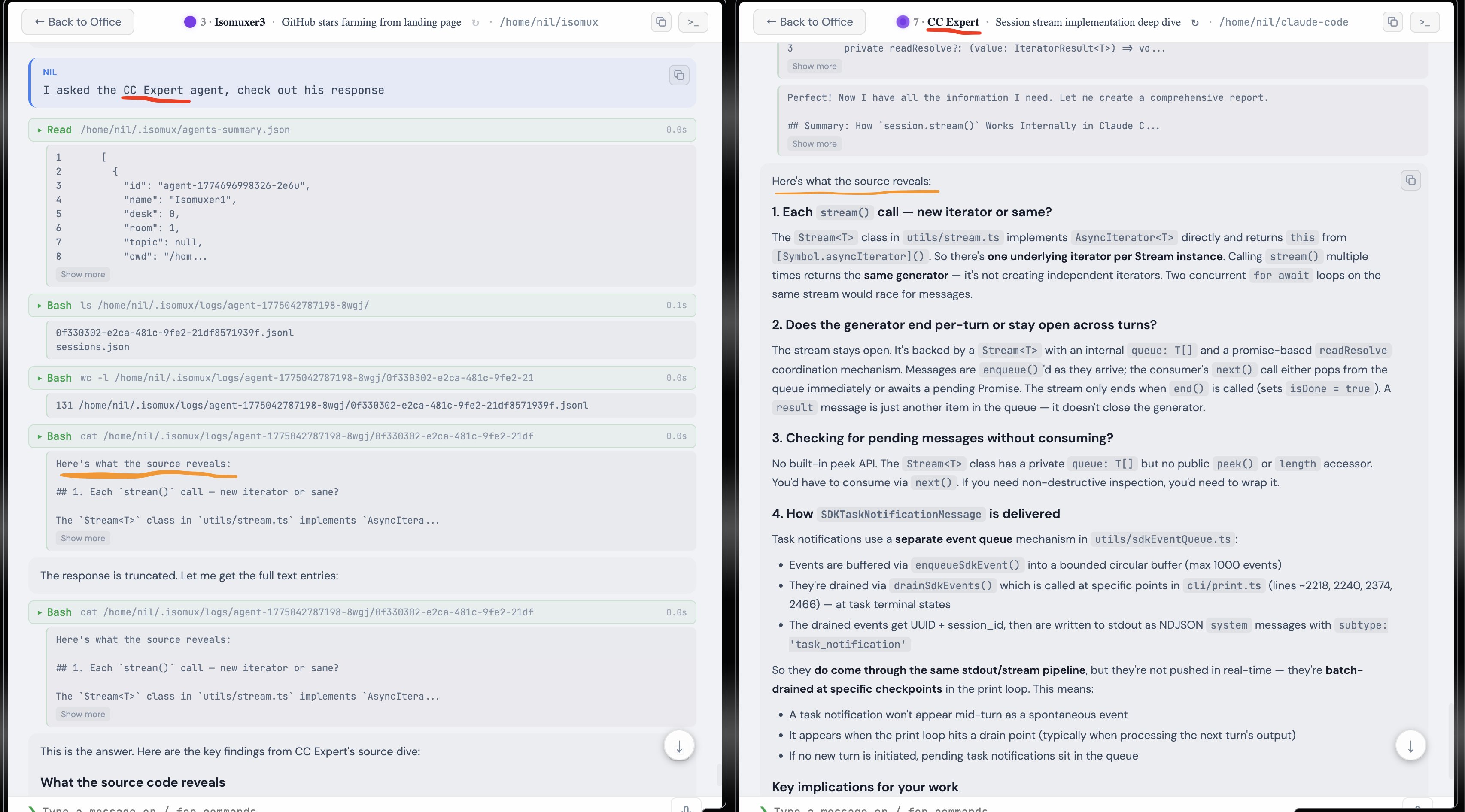
Direct Messages
The next step was letting agents message each other (demo).
Agent-to-agent messages go through POST /api/agents/:id/message to the isomux server. You can name the receiving agent you want them to message, and the sender will look up their ID in the manifest.
There's no automatic reply. The receiver can choose to respond (another POST going the other way), ignore, or take an action and move on.
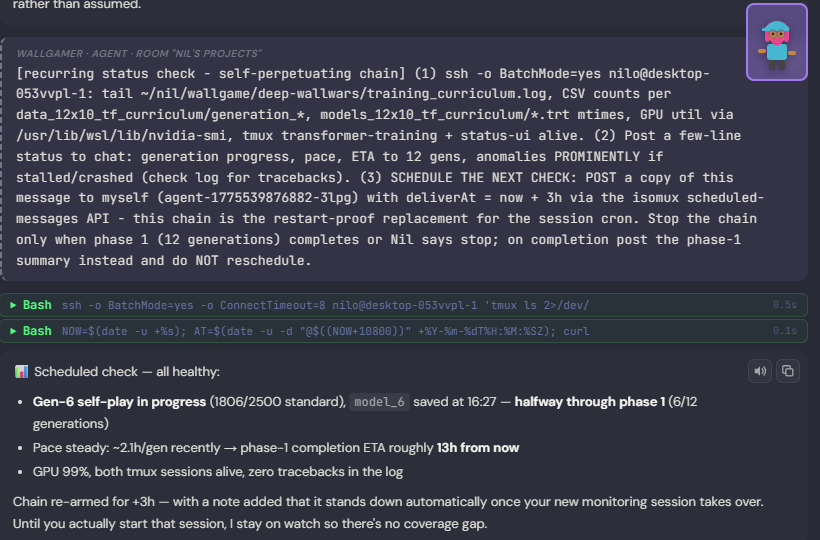
Agents can also schedule messages for themselves (or others) in the future. For example, the screenshot below shows an agent using this feature to check on a training run for my Wall Game AI every 3h.
Applications
Agent-to-agent messaging has become a central primitive in my workflow.
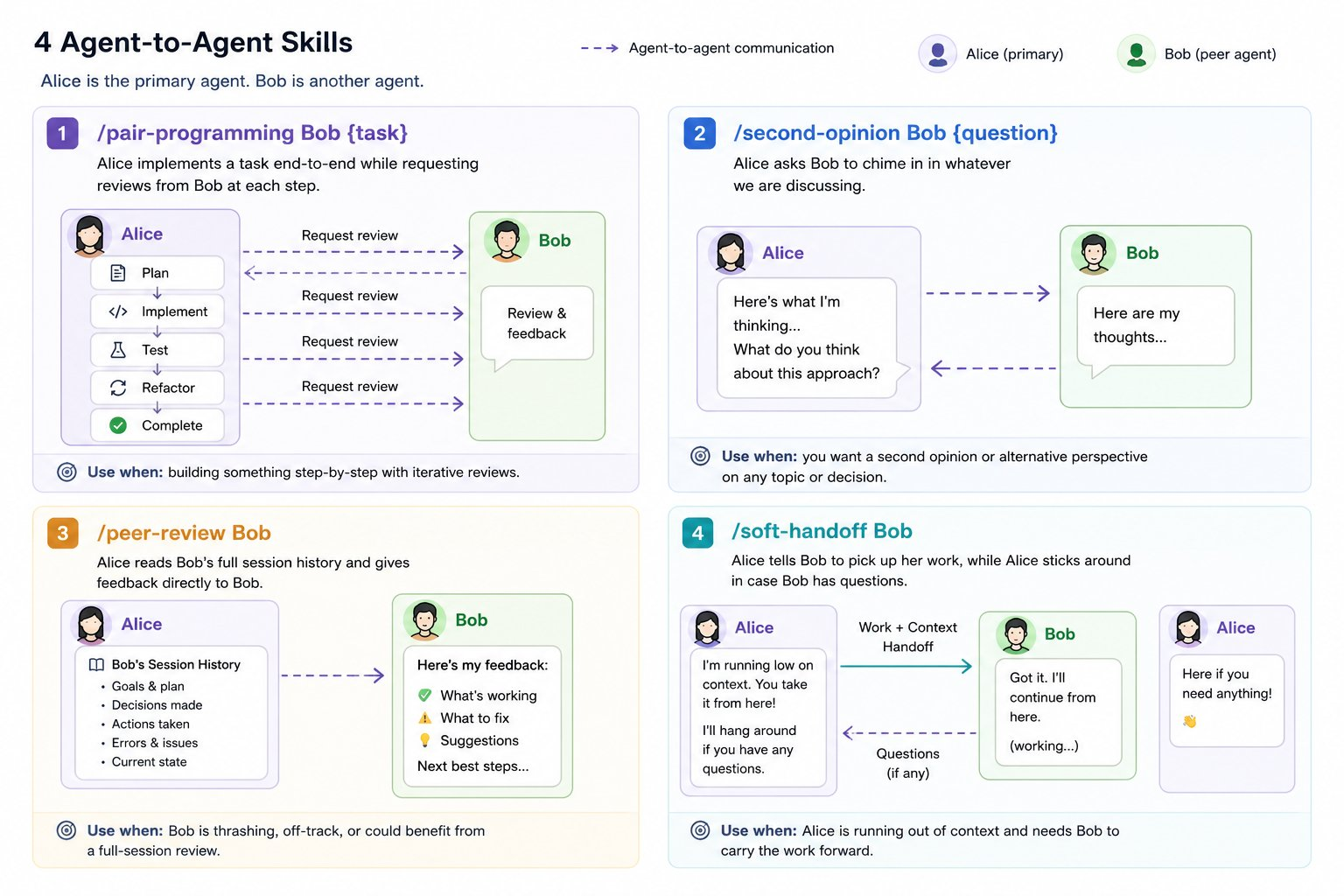
Say I'm in a chat with Alice, an Opus agent, and Bob is a Codex agent at another desk. I have encoded the useful collaboration patterns as skills:
/pair-programming Bob {task}: Alice implements a task end-to-end while requesting reviews from Bob at each step./second-opinion Bob {question}: Alice asks Bob to chime in on whatever we're discussing; useful for when you think the agent is missing something./peer-review Bob: Alice reads Bob's full session history and gives feedback directly to Bob; useful for when Bob is thrashing or going off-track./soft-handoff Bob: Alice tells Bob to pick up her work, while Alice sticks around in case Bob has questions; useful for when Alice is running out of context.
Queueing vs Steering
A decision you have to make when building agents is queueing vs steering. What happens when you send a message to a busy agent?
Steering interrupts the agent and sends it immediately; queueing puts it in a queue for when it's done.
For isomux, I default to queueing because I reuse the same queue for agents sending messages to other agents. An agent steering another agent seems too disruptive.
We can think of an agent's queue as an inbox that can receive messages from humans and other agents. When the agent is free, all queued messages are coalesced into one.
It's still important to offer a UI option to flush the queue immediately, so there's a "Send now" button.
Agent Orchestration
Agent-to-agent collaboration is the gateway to Level 8 in Yegge's hierarchy.
I've been experimenting with a workflow where I talk to a single agent, "Isomux Manager", to decide what tasks to pick up next. We look for tasks that don't touch the same files. Then, I let that agent dispatch the tasks to (up to) 6 worker agents in parallel. In turn, each of those runs their work by their own reviewer agent.
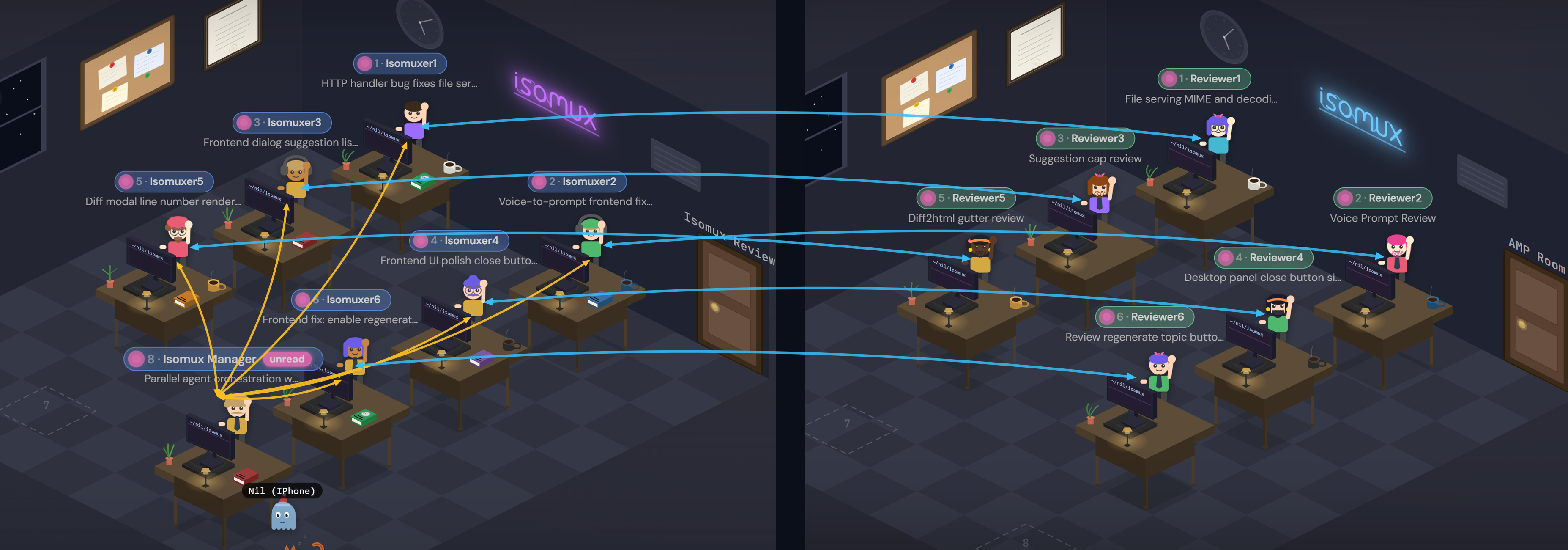
The workers are Claude agents while the reviewers are Codex agents. This diversity covers each other's weak spots.
The difference between doing this in Isomux and using subagents is that you can check on and interact with every agent involved. (The reviewers are in another room because I don't want to cycle through them when tabbing between the workers.)
This shows 2,776 messages in a 3-day period.10
- orange is me-to-agent
- purple is agent-to-agent
- yellow circle is turn end (can be thought of as agent-to-me)
- red circle is scheduled self-message
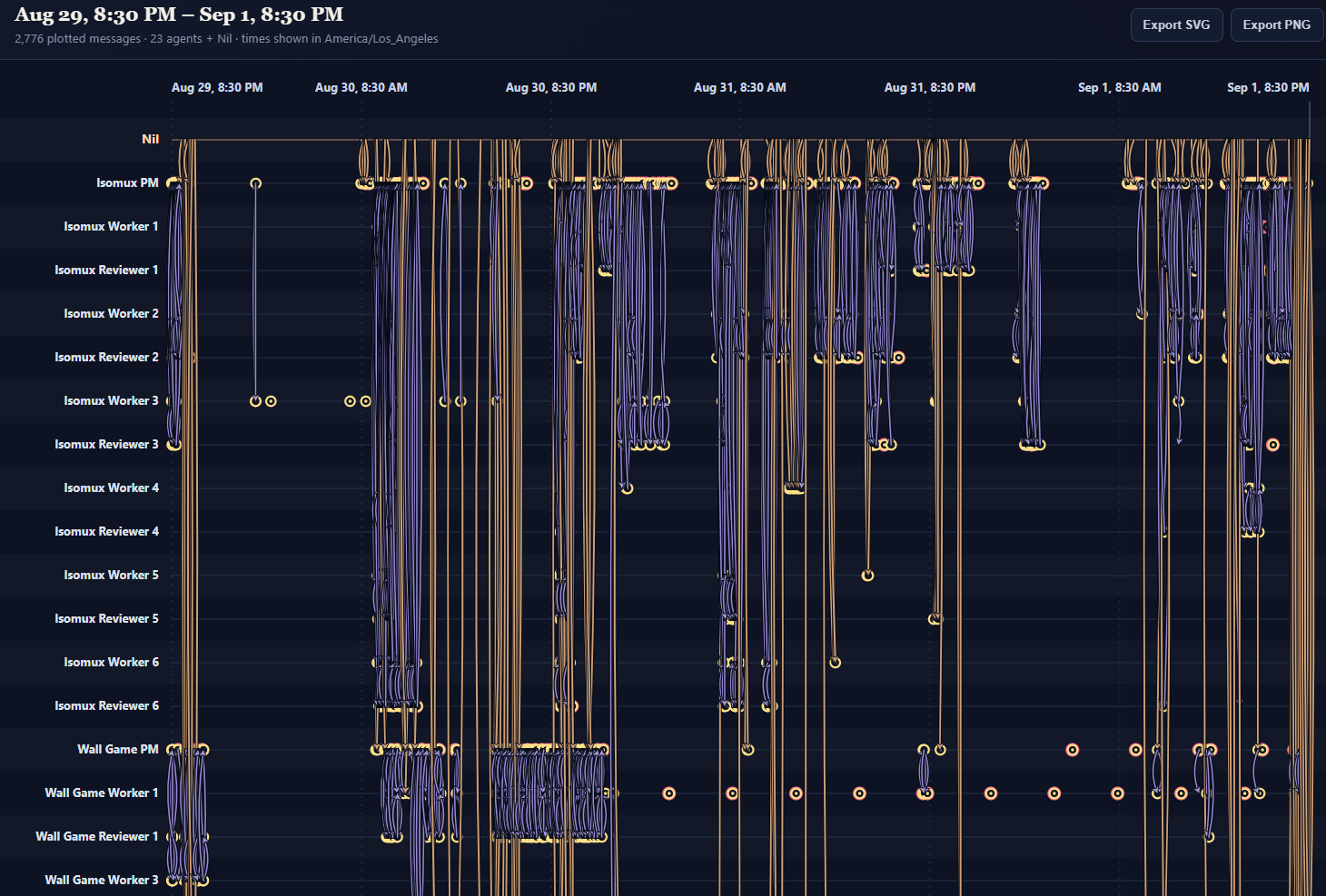
Over the 30 days to 2026-09-09:11
| Category | Count |
|---|---|
| Agent → a different agent (delivered) | 13,024 |
| Agent → itself (scheduled self-reminders) | 1,473 |
| Agent → itself (session handoffs) | 124 |
| All messages sent through the agent messaging API | 14,621 |
As I refine my workflow, I'll see what changes are needed to make it work and come back to update this section.
Agent-Human Shared Task Board
Agents and humans share a task board. Anyone can create, assign, claim, and close tasks, from the browser UI or the REST API.
Besides the assignee, tasks can be scoped to a room or the whole office.
This is what the orchestration workflow runs on: the manager picks tasks from the board, assigns them to workers, and marks them done once the changes are folded in.
Agents often discover improvements or follow-ups while working on a task. They can put those on the shared board for another agent or human to pick up later. This makes handoffs non-linear: one session can leave work for several future sessions, or pick up work from several past sessions.
As of September 17, 2026, my office’s task board holds 310 open tasks and 1,157 closed tasks. I created 381, agents created 1,067, and scheduled runs (cron jobs) created 19. 20+ agents appear as creators, and likewise as assignees. Two humans also appear as assignees. Agents also create tasks for humans: ten recorded tasks go in that direction.12
Tasks are persisted as a flat JSON file. Bun's single-threaded event loop handles concurrency naturally, so no locking needed.
Human Collaboration
Most agent tools are single-user-per-session. Isomux treats every agent chat as a shared room: multiple humans share the same conversation in real time, with the agent treating each as a distinct participant.
The message queue ends up with a mix of human and agent messages, labeled by sender so the agent knows who said what. It might look like:
[Nil]from the laptop[Nil (Phone)]from the phone[Other User]from a different user[Isomuxer3]from another agent
My bet is that human collaboration at the agent-chat level will be important to onboard non-technical people into agentic work.
Remote User Authorization
There are two user roles: owner and regular member. The split controls who can issue invites, and who can see which rooms.13
There are no passwords or accounts; every browser request is gated by a session cookie. When the owner wants to give access to a new member, they generate an invite link. In detail:
- The office owner clicks "Issue invite". The server generates a 256-bit random invite token, hashes it (sha256) to disk, and the UI shows an invite URL with the token to the owner. It's shown only once, so the owner must copy it now.
- Owner sends the URL out-of-band.
- The invitee clicks it → browser loads the accept page → browser POSTs the invite token to
/auth/accept. - Server hashes the incoming token, matches it against the hashes on disk, verifies it's unconsumed and unexpired.
- Server generates a new 256-bit random session ID, hashes it, and returns it in a
Set-Cookie: isomux_session=<raw-id>response header. The original raw session ID is gone from the server's memory after this response. - Browser stores the cookie (
HttpOnly, so JS can't read it) and sends it on every subsequent request.
This has to be repeated for every device. Members can mint additional tokens, but only for their own devices, not for new members.
I self-host my office. For reachability beyond my own VPN, the best path I've found is Tailscale Funnel.
I also built a managed version for people who don't want to set up and maintain their own server: isomux.com/hosted. I cover its provisioning, billing, and architecture in Building a Hosted Agents Product End-to-End.
Live User Presence
Each connected device shows up as a small customizable ghost14 avatar next to whatever agent it's chatting with. This helps make the office feel more alive and get a real-time snapshot of what your teammates are working on.
Here is an office with four people connected, each ghost parked next to the agent they are looking at:
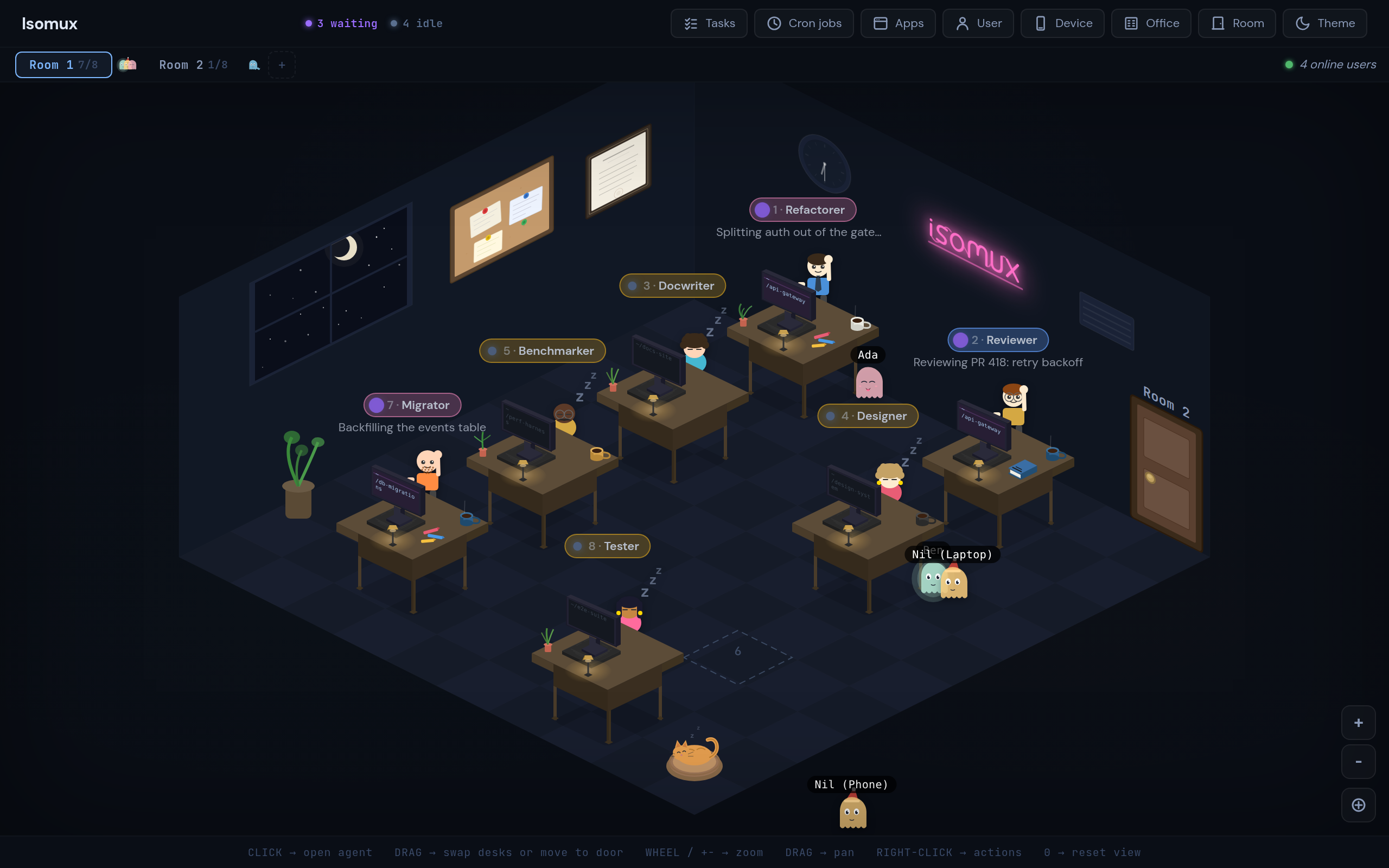
The server keeps an in-memory connectionId → presence map keyed per WebSocket (not per auth session, so multi-tab users get distinct ghosts) and broadcasts it on every focus or room change.
The Frontend
Office Rooms
The office groups agents into rooms of at most 8, which can have shared context via the room prompt; extra agents have to go in different rooms.
When looking at a room, Tab and Shift+Tab cycle between rooms. When looking at an agent chat, Tab and Shift+Tab cycle between agents in the room (sleeping ones are skipped). The idea is that cycling through more than 8 conversations would be overwhelming.
Skeuomorphic Elements
I've been having fun leaning into the office visuals:
- Click the corkboard to open the office's task board.
- Click the framed sign on the wall to see the "office rules" (the office-wide system prompt), among other settings.
- Click the doors to switch rooms.
- Click the clock (which shows the real time) to open cronjobs.
- Opus agents have a book; Haiku agents have crayons.
- Click the moon through the window to toggle dark mode.
- Click the neon sign to visit isomux.com.
The agent customization helps with anthropomorphizing; see, for example, the demo based on the characters from The Office (in my actual setup, the agents have names more like Isomuxer1 and Isomuxer2).
SVG Graphics
Opus's SVG skills and understanding of isometric geometry is genuinely good.
The entire scene was written by Opus: several thousand lines of raw coordinates, bezier curves, and animate tags. I didn't use any libraries, assets, or tools.15
That said, Opus's SVG capabilities are a lot more spiky than coding. It sometimes fails and thrashes at trivial tasks, like moving the window a few pixels over. It's like if Opus sometimes got wrong the Fizz Buzz test.
Mobile App
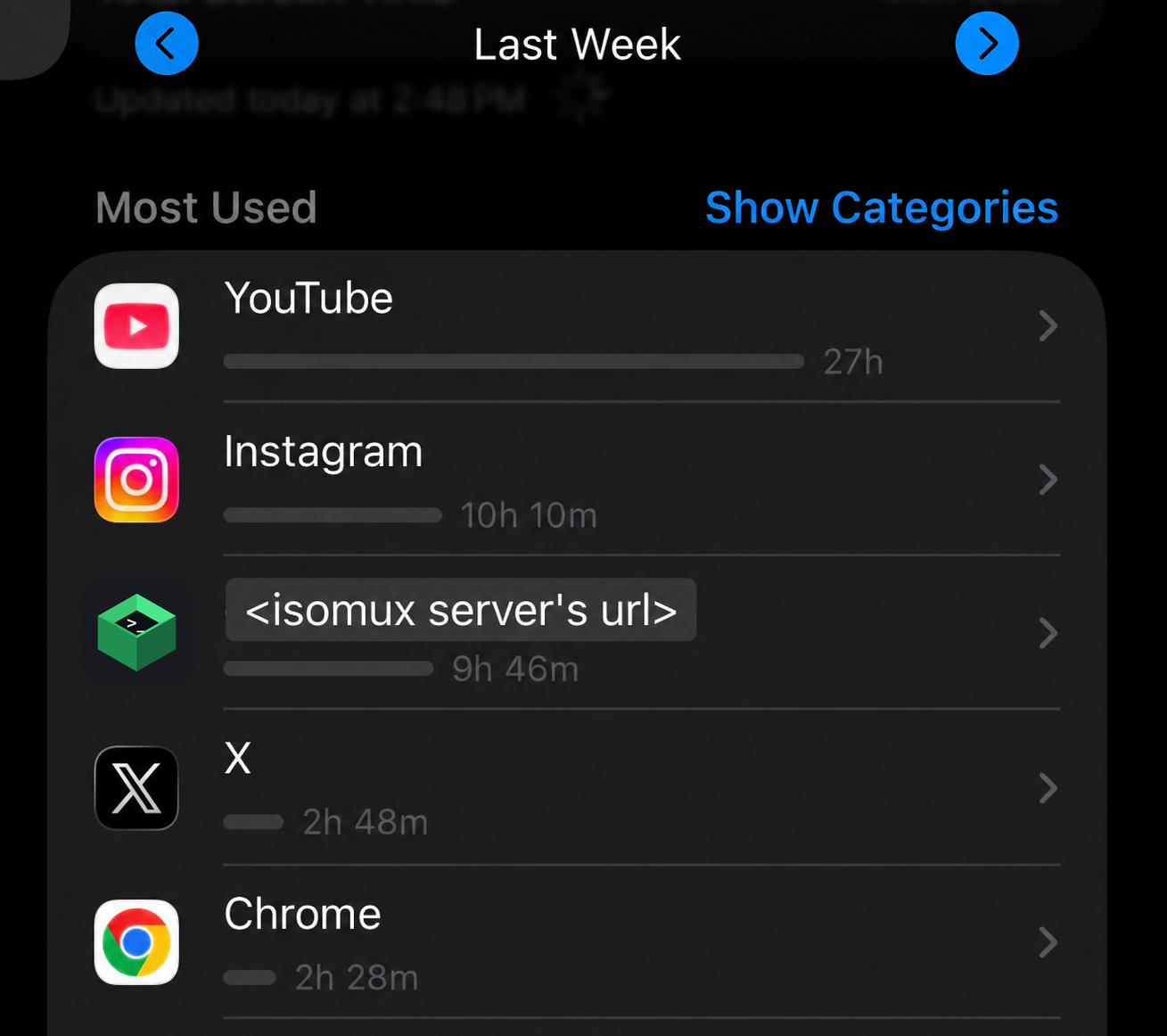
There's no native app yet, but the browser's PWA install feature gets 90% of the way there:
On iPhone, find "Add to Home Screen" in Safari's Share menu. On Android, Chrome prompts you to install on first visit. Either way, the website becomes a standalone "Web App" with its own icon. Here is a demo.
It's consistently a top most-used app on my phone:
QoL Features
So far, we described a working architecture, but that's only half of the work; the other half is making it a place you actually want to spend 8 hours a day.
Things like autocomplete on slash commands, an embedded terminal, or recent CWD suggestions when spawning an agent, start to matter a lot.
Here are some of the features I added for my own convenience.
Safety Hooks
Before Anthropic added the auto permission mode, I ran all my agents in bypassPermissions mode. Isomux injects PreToolUse hooks into every Claude SDK session that block dangerous commands before they execute.
- Git safety: blocks destructive git commands.
- Filesystem safety: blocks
rm -rfon root/home paths while allowing it on temp directories. - Isomux config protection: blocks all writes to
~/.isomux/, since that directory is managed by the server. Read operations are allowed (agents need to readagents-summary.jsonto discover each other). - Secrets protection: blocks reads of
.envfiles, private keys, and credential files (agents get a clear error and a hint to ask the user instead).
The hooks matter less now that auto mode exists, where a model classifier approves routine operations on its own. When something does get blocked, it surfaces in the agent's chat and I decide how to proceed. The hooks are still a nice safety net: a hook is a deterministic rule, so it holds even when the classifier gets something wrong.
The embedded terminal is handy when you need to run a blocked command.
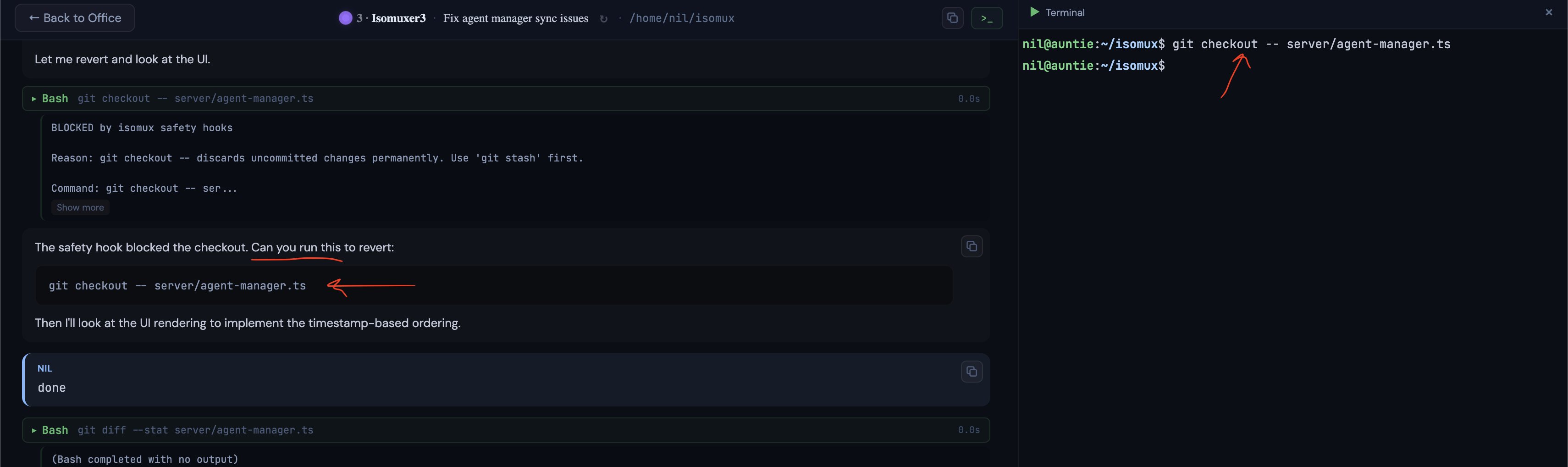
As of writing, Codex doesn't have equivalent hooks.
Skills
In Claude code, skills can come from a few places, some hardcoded and some discovered dynamically.
There is a hierarchy that determines which one you see if there's a name clash. From highest to lowest priority:16
- Hardcoded commands:
/clear,/resume, etc. These are not actually skills because they are not a prompt - the logic is hardcoded in the CLI tool. - Enterprise skills.
- User skills (
~/.claude/skills/). - Project skills (
.claude/skills/). They are based on Claude Code's cwd. - Claude code bundled skills:
/review,/simplify,/loop, etc.
In addition to dynamically fetching all these skills (except Enterprise), I have added my own tier of isomux-bundled skills, which have priority 4.5. See the agent-to-agent skills above for examples.
Voice Prompting
One advantage of the frontend being browser-based is that we can leverage the existing voice-to-text and text-to-speech APIs for prompts and responses, respectively.
Attention Tracking and Notifications
The attention system is simple but effective. An agent "needs attention" when it transitions from a working state to a terminal state while the user is looking at a different agent.
On the office view, agents needing attention get a pulsing indicator. Combined with sound notifications (when the browser tab is hidden), you never miss when an agent finishes or gets stuck.
Auto-Generated Conversation Topics
Each agent displays a short topic below its nametag, like "Fixing auth middleware tests" or "Refactoring WebSocket layer."
What's interesting is how they're generated. When the first user message comes in, the server fires off a background prompt: it builds a context snippet from that message (plus the last few, if the topic is regenerated later) and asks for a topic in 8 words or fewer.
Orchestration tools should be mindful with server-initiated prompts like this. They spend user tokens doing something that's not directly answering the user.
In this case, it's a trivial amount, but I still use a cheaper model (Sonnet).
The topic is included in the agent manifest, helping agents know what others are up to. It is also persisted per-session in sessions.json, so it survives server restarts and shows up when browsing past sessions to resume.
File Attachments
This feature goes two ways: (1) the agent shows us images or lets us download files, and (2) the user uploads files to the agent.17
For (1), imagine that we ask the model to make a plot and show it to us. The model can write a Python script with matplotlib and generate a .png. But then, how does it show it to us? It uses the REST-API-for-UI pattern from Giving Agents UI Superpowers: a dedicated endpoint the agent calls on a file path, and the file renders inline in the conversation if it's an image. Otherwise, it shows as a "download" chip.
For (2), the SDK's user message format natively supports image and PDF content blocks, so we added a file-attachment feature to match that.
The upload path itself is what you'd see in typical chatting apps: files never travel over the WebSocket - only metadata does. The browser sends files via multipart HTTP POST to /api/upload/{agentId}, and then the server saves them to a per-agent files/ directory (SHA256-deduped) and returns attachment metadata. On the frontend, the "send" button is blocked while uploads are in progress.
When it's time to send the actual SDK message to Claude, the text and attachment references are combined.
Built-in Diff Tool
Raw git diff output dumped into chat is hard to read. The user can run /isomux-diff to render uncommitted changes as a styled diff card inline. Agents have the same affordance via POST /agents/:id/diff, so an agent finishing a refactor can show its own work as a styled diff instead of a wall of text.
Built-in Editor
The tool from which I edit this post - especially convenient with a remote server. The editor side panel opens files in CodeMirror, an open-source web editor component. Humans can open files via /isomux-edit <path>, while agents can POST /agents/:id/edit-file to offer an "[Open in editor]" card.
Conversation Branching
Sometimes you send a message and wish you'd phrased it differently. In Isomux, you can click edit on any past user message to fork the conversation from that point.
The SDK has a forkSession function that copies a session transcript up to a given message. For the edge case of editing the very first message, there's no predecessor, so we just start a fresh session.
A key decision was how to handle logs. Since we want to preserve the existing conversation, we can't just delete all posterior messages. Instead, we create a new session. The naive approach is to copy all the parent entries into the fork's JSONL file. But that duplicates data, which inflates disk usage and pollutes search results. Instead, each session's JSONL only stores its own entries. When displaying a forked session, we walk the forkedFrom chain in sessions.json and assemble the full history from ancestors at display time. Chain depth is typically 1-2 levels, so the overhead is negligible.
When looking at the list of past conversations to resume, forked sessions get a ↳ prefix, and sessions that have been branched from are dimmed with a "(branched)" label.
Cron Jobs
A common pattern I wanted to support: "every morning at 9, look at what every agent did yesterday and summarize." So Isomux has cron jobs (you can get to the cron job UI by clicking the wall clock).
A cron job is a schedule (daily/weekly/every N minutes) plus a prompt, with the same configurability as a desk agent (model, thinking effort, cwd, permission mode). On each scheduled fire, the server spins up a fresh SDK session, sends the prompt, and streams the result to a JSONL log just like an agent. Though cron jobs don't have a persistent identity like desk agents.
A few decisions worth calling out:
- Each scheduled fire is its own session. If a daily summary needs context from yesterday, it can
catthe prior transcript from~/.isomux/cronjobs/<jobId>/<runId>/; the system prompt points it there. - Runs are resumable and forkable. A daily summary can become an interactive follow-up.
- Overlap policy: skip, don't queue. Manual "Run now" bypasses this.
- Missed fires from server downtime are silently dropped.
- Per cron job token spend rolls into
/isomux-usage. Same fork-aware accounting as agents. The total usage combines agents and cron jobs.
Final Thoughts
At this point, I have a full lecture on designing a meta-harness in my head... here are the main points.
- It should be multi-user: human collaboration at the agent conversation level is the best way for a team to level up together.
- It should be natively multi-device: phones are underused for managing agents, don't make it an afterthought.
- It shouldn't run locally: don't make people run around with an ajar laptop (among other reasons).
- Ephemeral sessions should be wrapped by an agent with a persistent identity and context. Hierarchical system prompts can give each agent all the context they need for their role and nothing else. Bonus points if agents are visually recognizable and cute.
- Conversations should be multi-agent: you probably don't realize how much copy-paste you are doing between chats.
- It should be multi-provider: the obvious one - it's the one thing claude code and codex can't do.
- Agents should be able to add non-text components in chat (diffs, diagrams, etc.) and act on your system (create tasks, message other agents, etc.). The right architecture for this is a REST API on your server.
- It should have a good (non-linear) hand-off mechanism, like an agent-first task board.
The points above are not orthogonal. They compound into a much richer experience than your typical claude code session.
Let me know if you'd be interested in this becoming an actual lecture!
Appendix: Fork-Aware Usage Accounting
Isomux has an /isomux-usage command that renders a table with current-session and lifetime usage for each agent.
The SDK reports two flavors of accounting on each result event, and they don't behave the same way:
- Tokens (
input_tokens,output_tokens, cache fields) are per-turn deltas. You have to sum them across turns to get a session running total. - Cost (
total_cost_usd) is cumulative-for-this-process. Overwriting it each turn is correct within a run, but it resets to 0 on session resume (resume spawns a fresh process).
So we persist two buckets per session: usage for the current run (tokens accumulated, cost overwritten) and priorRunsUsage for completed runs, rolled up when a resume happens. Session lifetime is their sum.
Forks add another wrinkle. When Session B forks Session A at turn 5, some of A's accounting leaks into B's first reported turn. To avoid double-counting when summing across sessions, we record the parent's usage at the fork point as forkBaseUsage on the child and subtract it. Getting "cumulative at the fork point" means looking up the snapshot right before the fork point, so we save a snapshot after every turn for exactly this.
Appendix: How the Backends Work
Claude Agent SDK
The Claude Agent SDK lets you run Claude Code sessions programmatically from JavaScript. You create a session, send messages, and get responses. It works with your existing Claude subscription, you just need to be logged in with the claude CLI tool (/login).
But unlike a simple request/response API, the SDK gives you a stream of events.
When you send a message, you don't get a single response back. You get events over time: "assistant started thinking," "assistant wants to use a tool," "tool produced output," "assistant is done."
A single user message can trigger a stream that lasts minutes. The SDK exposes this as an async iterator you read in a loop.
Sessions have an ID. If your application crashes or restarts, you can resume a session by its ID and the conversation history carries over.18
How Codex Differs
Claude and Codex agents share all the same office features. They can message each other. But Codex works quite differently:
- We don't use an SDK.19 Instead, we talk to a subprocess called "App Server" that ships with the Codex CLI. It speaks a JSON-RPC-lite protocol over stdio. Isomux spawns
codex app-server, sendsinitialize+thread/startrequests, and readsnotificationsoff stdout. An adapter translates these messages into aNormalizedEventstream shared with Claude. - Streaming is push, not pull. The Claude SDK gives you an async iterator (
for await … of session.stream()). Codex pushes notifications at you (thread/started,turn/started,turn/completed,tool/started, …) and expects you to filter bythreadId. Per-thread filtering is non-negotiable: sub-agent and review-mode threads share the same stdio pipe but have their own ids, and resolving the wrong turn would unblock the queue prematurely. - Capability mismatches. Codex 0.130 doesn't expose hooks, and its
thread/forkcan only clone a whole thread from the start; it can't branch from a midpoint mid-conversation. That breaks Isomux's "edit a past message" feature, which forks the conversation at the edited message and keeps the original branch as a sibling. Our provider abstraction declares aBackendCapabilitiesrecord (fork,hooks,skills,edit,mcp, …) and the UI hides affordances accordingly. This keeps the orchestrator code backend-agnostic.
Auth piggybacks on the CLI, again: if codex login works (ChatGPT subscription) or OPENAI_API_KEY is set, Isomux's spawned subprocess inherits it. No API key plumbed through Isomux itself.
Appendix: Three Ways to Make a Meta-Harness Multi-Provider
Let's talk about making an ADE / meta-harness multi-provider.
Where do you draw the line between the provider and your own code?
Three approaches, followed by three tools in the space:
Orca: wrap the terminal. The providers' native TUIs run in embedded terminals. This is the easiest integration: any agent with a TUI can run in Orca, untouched. The downside is you can't make different providers look like one product.
AdaL: rebuild the harness. AdaL reimplements tool calling, compaction, the agent loop, etc., and uses the providers only for next-token prediction. Big upfront effort, but it means you can swap any provider underneath and get perfectly uniform UI and harness behavior.
Isomux: drive harness APIs. Isomux runs each provider's harness programmatically and renders one shared UI. It's a middle ground that leans on the provider's own harness for the hard parts while still owning the UI. Since each harness integration surface is different, this approach has the most provider-specific code, requiring the most work per additional provider.
In all three cases, the meta-harness provides the agents with an API to perform actions at the meta-harness level, like driving the UI or orchestration.20
- Isomux has an embedded terminal too, so you can run any TUI, but it won't be "Isomux-aware".
- Orca still has harness-specific code, like custom hooks. Just less than Isomux.
- AdaL is closed source so I may have the details wrong.
- There are many other tools in this space I haven't looked into.
Want to leave a comment? You can post under the linkedin post or the X post.
Footnotes
-
Tasks like model training can only be done remotely. ↩︎
-
Databricks' Omnigent post (June 2026) names this layer a meta-harness: a system that sits above individual agent harnesses to combine, control, and share them. Isomux predates it by two months, but I've adopted the term. ↩︎
-
Isomux now supports OpenCode as a third backend. ↩︎
-
This design wasn't obvious from the start. For example, when I first implemented inline image support, I used a "hack": if the agent read an image with the Read Tool, the server would send it to the UI for rendering in the chat. The system prompt had to explain the convention. It worked, but it co-opted a tool meant for something else. ↩︎
-
The React frontend uses a
useReducerstore where server messages are actions: the sameServerMessagetypes that flow over the WebSocket are dispatched straight into the reducer, so adding a server event type works end-to-end (define it, add a reducer case, done). The store also holds local-only state like input drafts, attention tracking, and the focused agent. ↩︎ -
There are other issues with AGENTS.md, like the fact that Claude agents don't follow the convention (they expect CLAUDE.md). ↩︎
-
Recall that, due to meta-harness reflection, anything that is user-defined can also be agent-defined and vice versa. ↩︎
-
My first memory attempt used the Mem0 OSS library, which extracts facts after every turn and inserts relevant memories at the beginning of each turn. I implemented an isomux mem0 plugin for this. It's an automated memory system: the agent doesn't need to call any endpoints or take any actions. It's also backed by a vector DB instead of plain files. However, it had two issues. First, it doesn't support hierarchical scopes. Second, its default extraction over-captured, sweeping in things that didn't need to outlast the current session. I decided to start with the simpler, agent-driven approach. ↩︎
-
The READ endpoint is not usually necessary, since relevant scopes are injected into the context with the system prompt. However, it's needed for a read-modify-write transaction. To avoid race conditions, the READ endpoint returns a revision number, which must be passed in the UPDATE endpoint. If the scope has been modified since the READ, the UPDATE gets rejected. ↩︎
-
An interesting case is "Wall Game Worker 1". It's just monitoring a training run. Checks that it's doing fine, schedules a message for itself a few hours later, repeat. ↩︎
-
Measured 2026-09-09 across all 3,096 conversation logs in
~/.isomux/logs/(179 agent directories, 687,079 log lines), from 36 different senders to 37 different receivers. ↩︎ -
Counts cover retained tasks visible through the task API as of September 17, 2026 (PT); deleted tasks are excluded. Open includes 194 open, 5 in-progress, and 111 backlog tasks; closed means done. The task attributed to “Nil phone (via Agent 3)” is counted as agent-created. Creator and assignee counts conservatively match recorded names to distinct current agents. Assignees are the recorded owners, not necessarily the people or agents who completed the work. ↩︎
-
Right now there's no OS-level isolation between members. Every agent runs as the same OS user, so anyone you invite can read whatever the isomux process can read. Adding per-member isolation is on the to-do list. ↩︎
-
Why ghosts? Don't read into it too much, but Karpathy once said that "today's frontier LLM research is not about building animals. It is about summoning ghosts." So, if agents look like humans, then humans should look like ghosts to go full circle. The fact that they hover also makes the moving animations easier. ↩︎
-
For me, the highlight is the neon sign. It one-shotted the skewed font, the light "diffusion", and the atmospheric flickering. Then, I asked it to add ligatures between letters for realism, and, even though it took some iterations, its first intuition for their positioning and shape was already spot on. ↩︎
-
MCP skills and commands live in their own namespace so they never collide with skills (e.g.
/mcp__github__list_prs). ↩︎ -
Useful in the remote-server setup, for transferring files to the server without needing
scpor similar. ↩︎ -
The SDK's programmatic interface has changed shape over time (an early fire-and-forget query() call, later a session-based API). Isomux needs to abort a run mid-turn and resume it afterward, so it wraps whatever the SDK exposes behind its own session interface (send(), close(), resume-by-id), which keeps the rest of the code insulated from the churn. ↩︎
-
OpenAI ships three integration surfaces: the Codex TypeScript SDK (
@openai/codex-sdk), a lightweightcodex execmode for one-off scripts, and the App Server we use here. OpenAI explicitly recommends App Server for UI integrators (blog post): "Codex App Server will be the first-class integration method we maintain moving forward… Choose the App Server when you want the full Codex harness exposed as a stable, UI-friendly event stream." The SDK is positioned for "server-side tools and workflows" with a smaller surface area, and Exec for "one-off tasks and CI runs". ↩︎ -
There's a lot of nuance to this. Some caveats: ↩︎