Browser Use for Cloud Agents: An Implementation Guide
Browser Use has become a must for agents. I use it to navigate portals and dashboards, order stuff, and much more.
Ideally, the agent and you co-steer the same browser. You may need to step in, e.g., to log in or pay. But what if the agent doesn't run on the same machine where you browse?
That was my question when implementing Browser Use in Isomux. Isomux is a "meta-harness" which means that it's a single process that runs many Claude Code, Codex and OpenCode agents side by side. It is typically hosted server-side, like in a VPS or a Cloud provider. Users connect to it with browser clients, which, as we'll see, was part of the challenge.
In this post, I share what I learned, which applies broadly to cloud (or any non-local) agents.
Overview
After considering and ruling out many alternatives (as explained below), we landed on the following architecture:
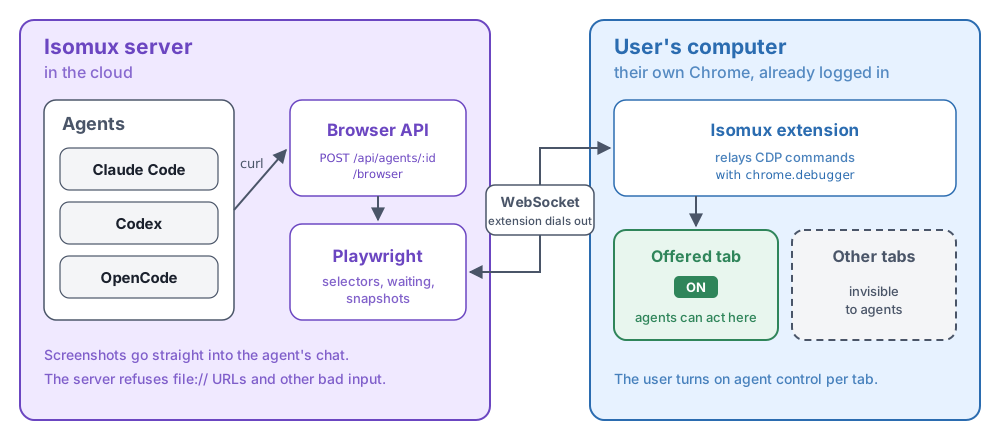
The browser is the user's normal browser. Isomux controls it with the Playwright library.1 A browser extension bridges the two and lets the user choose which tabs to share. The agents access the browser via an Isomux API.
Making Browser Use multi-provider
For a single agent, the obvious move is to attach Playwright MCP to it. But with multiple agents, each one launches its own browser, so you pay the browser's fixed cost (about 350 MB) once per agent.
Instead, the Isomux server controls the browser with Playwright, and every agent reaches it through the same API. Ours is an HTTP route, POST /api/agents/:id/browser, that agents call with curl, like the rest of the Isomux API. What matters is that the meta-harness layer controls the browser:
- Agents share one browser instead of running one each. They can even co-steer the same tab.
- The server can refuse things before the browser sees them, like
file://URLs. - The server drops screenshots into the chat the same way for every harness.
Agents open a page with goto, read it with snapshot, text, or screenshot, and act on it with click, fill, press, and upload. When they're done, close gives the tab back to the user, leaving the page open.
The main way to read a page is snapshot. It returns Playwright's ARIA snapshot, the same page representation Playwright MCP uses: the page's accessibility tree as compact text, like button "Place order". From it, the agent learns what's on the page and which elements it can click or fill, without screenshots or raw HTML.
Where the browser runs
Controlling the browser from the server doesn't settle where the browser itself runs.
We landed on the user's own Chrome, controlled through an extension. There are two main advantages:
- It's where the user is already logged in. In my experiments with other solutions where I had to log in again everywhere, I found it very annoying. Especially since these days many places require 2FA etc.
- It's the "browser shape" most trusted (i.e., human-like) by websites. If the browser runs headless on a server, some websites notice (or the proxy in front of them, say Cloudflare), think it's a bot, and refuse it. Websites may even notice that the IP is from a data center.
However, it has downsides too:
- Requires setting up the extension. It's an additional thing for the users to update independently. I see this as the biggest downside.
- The user's computer must be on.
- Phone-only users can't use it.
- Multiple Isomux members can't co-steer or even view the same browser, breaking symmetry with every other feature which is fully multiplayer.
We tried hard to make server-side browsers work, or at least remove the extension requirement, but everything else we tried was worse. See What didn't work.
If a meta-harness has a proper desktop client, then it can run an actual browser inside of it, so the extension is not needed. The extension is needed for a web app like Isomux, because you can't run a browser inside a browser.
Design of the extension bridge
- We keep Playwright on the server, as mentioned. The extension is a thin relay. It uses
chrome.debuggerto send CDP (Chrome DevTools Protocol) commands to a tab, and Playwright connects to that relay through its publicconnectOverCDPtransport overload.2 - Why an extension at all? Chrome can be remote-controlled through a debugging port, but since Chrome 136, that only works with a separate profile, not the everyday one with your logins. An extension works inside your normal profile.
- The extension opens an authenticated WebSocket to the server. Since the extension initiates the connection, we don't need to open a port on the user's machine.
- Pairing. The Isomux web app shows a short-lived, one-time code in the Browser Use Settings. The extension trades it for a credential.
- The user offers tabs. There's an "Agent control" toggle per tab, and an "ON" badge on the extension icon shows when a tab is connected. The agents can't see other tabs.3
- The user selects which agents have access, and for how long. Isomux is multiplayer, but each agent has a main "owner". By default, when a user connects their browser, all their agents can use it, but you can narrow it down to specific agents. Agents owned by other office members never get access. You can also have a tab released from agent control automatically after 15 minutes, 1 hour or 4 hours. The default is "Never".
- Only allow-listed commands get through. The server and the extension both check every command. Commands that read the browser's cookie jar, change the browser profile, or open new tabs are refused.
- Actions are not retried automatically. If a click times out or the connection drops, nobody knows if it went through, and a retry could submit a form twice. Instead, the agent is told the outcome is unknown, so it can check the page before it tries again.
Lessons
Here's what the agents ran into during the implementation, for reference:
- Test against the user's real Chrome. A browser launched by Playwright comes with defaults that hide bugs. Clicks in background tabs worked in our tests and hung in real Chrome.
- Let agents follow popups. OAuth and "share" flows open popups, and the agent needs to keep working in them.
- Send file contents, not paths. The files the agent has access to live on the server, not on the machine running the browser. Also suppress the OS file picker, or it stays open on the user's screen.
- Give agents a way into iframes. The page snapshot skips the content of child frames, like embedded forms or editors. For example, let the agent name the frame in the request.
- Add rich text to the snapshot. The ARIA snapshot can miss what's typed in a rich text box, so append the rendered text.
- Let agents scope reads. Snapshots of long pages get huge. Let the agent read just one element with a selector.
- Warn users about the debugging banner. Chrome shows a huge and distracting "started debugging this browser" banner, and dismissing it ends the debugging session. You can't change that.
- Expect the extension to sleep. Chrome suspends extension service workers. Keep a heartbeat, and reconnect with backoff.
What didn't work
Headless Chrome on the server
It's the natural choice for server agents, and for multiplayer meta-harnesses specifically. One browser serves every device (even a phone), and several people can watch the same page.
The agent side worked:4
- One shared browser. Each agent got an isolated browser session (a Playwright "browser context"), with its own tabs and cookies. The browser costs about 350 MB, and each session adds 160-220 MB. With six agents, it took 1.3 GB, versus about 3.4 GB for six separate browsers.
- Saved logins. Isomux is multiplayer: several people share one server, each with their own agents. Each person got a saved login profile (Playwright
storageState), shared by their agents.
Two things broke it:
- Websites block it, as mentioned above. That's out of your control.
- Letting users see and co-steer requires a way to show the browser on a different machine. We couldn't find a good option for this.
Showing a server browser in a web app
We tried multiple ways of streaming pixels, although it's inherently a janky approach. When the user clicks, the client turns the click into page coordinates and sends them to the server, which replays the click in the browser. Most interaction styles, like selecting or copying text, require extra work and don't feel native.
But maybe that's tolerable if the agent is doing most of the navigation. We tried a few approaches:
- Screenshots. Chrome's built-in screencast sends a JPEG of the page each time it changes. We sent those over a WebSocket, and sent mouse and keyboard back. We tuned it a lot: binary frames, backpressure, sizing the viewport to the panel, high-DPI captures. Still laggy, especially scrolling.
- Video. We ran Chrome on a virtual screen (Xvfb), encoded that screen as H.264 video with ffmpeg, and decoded it in the client with WebCodecs.
- WebRTC video, the real-time tech behind video calls, using Neko, an open-source tool for sharing a server browser this way.
- Remote desktop (VNC), the classic way to view and control another computer's screen, in a web page with KasmVNC or TigerVNC with noVNC.
- Tab capture with
getDisplayMedia(what video calls use). Chrome asks "share this tab?" first, which needs a human, and disabling it could be risky. Even past that, it's still a video from the same server browser.
We benchmarked the first four on the same click-to-pixel test. The best was H.264, with a median of 102.7 ms, against 104.3 ms for the JPEG stream. Video used less bandwidth and scrolled more smoothly, but clicks weren't faster, and it needed more dependencies, like a virtual display.
We also tried "streaming" the DOM (or DOM updates), which, if rendered locally, could feel native, take less bandwidth, and have less lag.
While promising in principle, we couldn't find a good library that did this. We tried rrweb, which sends a copy of the page to the client. But it's built to replay a page, not to send input back. In our prototype, updates from the server clashed with typing on the client.
Embedding sites on the Isomux client
The client is already in a browser, so theoretically it has all the machinery to show and browse websites. However, browsers are designed with security principles that prevent this.
- Plain iframe embedded into the Isomux client: many sites refuse to be embedded.
- Scramjet, a rewriting proxy: pages loaded and typing worked, but video playback, Amazon and navigation broke. It's also AGPL.
- Electron webview, like Orca does. Feels native, but needs a desktop app.
- Chrome compiled to WebAssembly: nothing usable seems to exist.
Final thoughts
This is mostly just a reference of what works and doesn't work as of September 2026. You may want to point your agents to it if they are designing Browser Use. Isomux's code is on GitHub, so you can use the actual implementation as reference.
What I actually want doesn't seem to exist: a browser that runs on machine A, that I use from machine B as if it were native, with real scrolling, selection, and typing; with only the network round trip as lag. It feels like a missing piece of internet infrastructure.
Until that exists, the "extension tax" turned out to be worth it. It's been working robustly for a while.
Want to leave a comment? You can post under the linkedin post or the X post.
Footnotes
-
Playwright is Microsoft's browser automation library. ↩︎
-
This keeps Playwright's selectors and auto-waiting, and the agent-facing API stays the same. Playwright's own extension relay is good prior art. ↩︎
-
Our first version let agents open their own background tabs, but it felt "wrong" not being able to visually track the tabs the agents touched. ↩︎
-
One gotcha: Playwright installs its own SIGINT/SIGTERM/SIGHUP handlers by default. They swallowed our shutdown signal, and the server hung on stop. Set
handleSIGINT,handleSIGTERMandhandleSIGHUPtofalse. ↩︎